Saturday, May 2, 2026
Home Blog Page 14

Operations of AI production system: Introduction to Control strategy, Production system Vs Conventional Computation

Operations of AI production system

The operation of AI production system can thus be characterized  as a search process in which rules are tried until some sequence of them is found. To solve a problem using a production system we must specify the database Rules

Control Strategy

Converting a problem statement into the above three components of a production system is the problem  representation in AI. Once this is successfully done we only have problem solving which is just about searching in that problem space for the given goal state given the initial state.

A production system consists of productions (rules), a working memory of facts (database) and   Control strategy is about an algorithm for producing new facts from old. As we have seen in the 8 puzzle example a rule becomes eligible to fire when its conditions match  some set of elements currently in the working memory. As it matches left side the rule is fired and we have new facts, which is the facts that are generated on the right side of the rule.

A control strategy determines which of the several eligible rules fires next. It is important to realize   the difference within production system and conventional computation.

Production System Versus Conventional Computation

 Though both the systems use hierarchically organized programs, they have many differences .Irrespective of any local database, global database is accessible for everyone..

Here the communication takes place only between the databases but not between the rules.

Production system structure is modular; changes to any of the components made independently.

Using Conventional Computation in AI application is difficult, For any change in knowledge base would require extensive changes to the program
Inverse Laplace Transform

0

Ilaplace command used to perform the inverse laplace transform for the given function. Let us consider an example;

F(s) =


F= 5*(s+2)/(s*(s^2+9*s+5));

 ilaplace (F)

ans = 9*exp(-2*t)*cos(t)+3 *exp(-2*t)*sin(t)+5

In inverse laplace transform function hyperbolic expression can solved

Sinh(x)=

Cosh(x)=

Fourier Transform In Matlab:

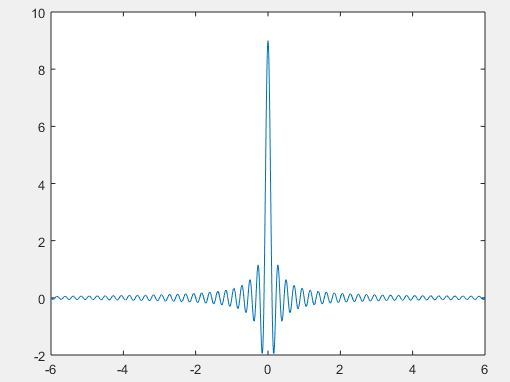
Some numerical methods are used for solving continuous time signals in matlab with Fourier transform. Let us choose an example to plot fourier transform function

f=-6:.01:6;

 X=9*sinc(9*f);

 plot(f,X)

Fast Fourier Transform:

Depending on the length of the sequence being transformed with the DFT the computation of this transform are often time consuming. The Fast Fourier Transform (FFT) is an algorithm for computing the DFT of a sequence during a more efficient manner. MATLAB provides a inbuilt command for computing the FFT of a sequence.

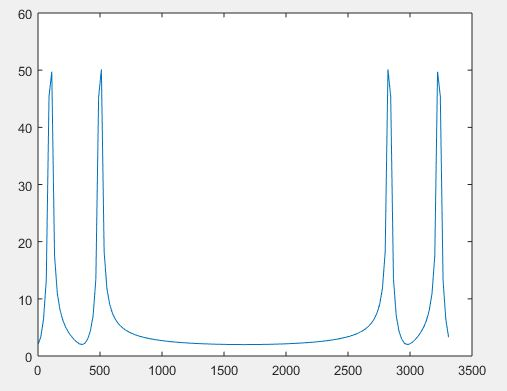
For example, using the same two-frequency signal x(t) used above we can produce a sequence of samples of length N = 150 spaced every Ts = .0003 seconds as shown previously.

Whilethe frequency components are spaced every 1/(N*Ts) Hz and the corresponding frequency values  are from 0 to (N-1)/(N*Ts) Hz as shown below.

In order to plot a fast fourier transform (fft) by using fft command

clear

 N=150;

 ts=.0003;

 deltaf=1/(N*ts);

 t=[0:N-1]*ts;

 x=cos(2*pi*100*t)+cos(2*pi*500*t);

 Xf=fft(x);

 f=[0:N-1]*deltaf;

 plot (f,abs(Xf)

In order to plot a fast fourier transform (fft) we should follow two rules

In order to plot a fast fourier transform (fft) we should follow two rules
Select Ts as large as possible but in order that the very best frequency component in your signal is a smaller amount than 1/2Ts. 2.

After determining the worth of Ts, select N in order that 1/NTs, the frequency resolution is little enough to accurately display your frequency components.

INTEGRATION IN MATLAB

0

INTEGRATION IN MATLAB

Integration will solve two different type of problems in matlab they are;

Indefinite integral

It is reverse of differentiation operation in this derivative of the function is given and we have to find function.

Definite integral

It  involve adding up a very large number of very small quantities and then taking a limit as the size of the quantities approaches zero, while the number of terms tend to infinity and it useful for finding area, volume, moment of inertia, center of gravity  and work done.

Int command is used to find integration of given function

Let us consider an example

Syms x

expr = -2*x/ (1+x^2)^2;

y = int (expr)

Output is

y= 

POLYNOMIALS:

Polyval command is used to execute the matrix polynomial. Let us consider an example, in order to evaluate our previous polynomial p, at x = 4, type:

p = [1 7 0 -5 9];

Polyval (p, 4)

ans = 693

TRANSFER FUNCTION:

In order to solve transfer function in matlab we use an fft, Laplace, fourier commands to execute matlab transfer function.

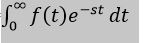
 Laplace transform in time domain is represented as function f(t) is given by the following integral:

|f(t)|=

And also Laplace transform designed as a transform function of f(t) to F(s). We can see this converted transform or integration process f(t), as a function with a  symbolic variable t, into another function F(s), with another variable s.

Differential Equation In Matlab

0

Ribbon three dimensional plot:

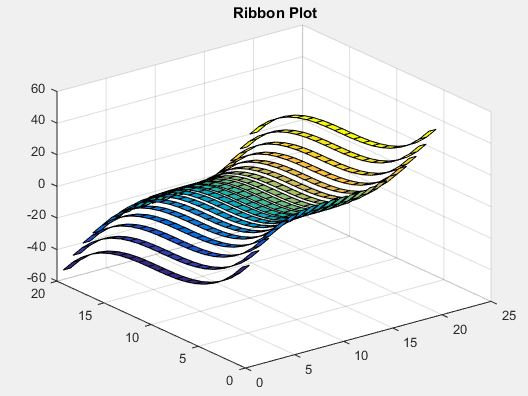
In this three dimensional plot has different color ribbon, in order to create 3d plot for given function.

Let x^3-y^3

[x,y] = peaks(20);

z =[(x.^3)-(y.^3)];

ribbon(z);

title(‘\bf Ribbon Plot’)

Contour three dimensional plot:

Syntax for the contour plot is

Contour3(x,y,z)

Contour3(z)

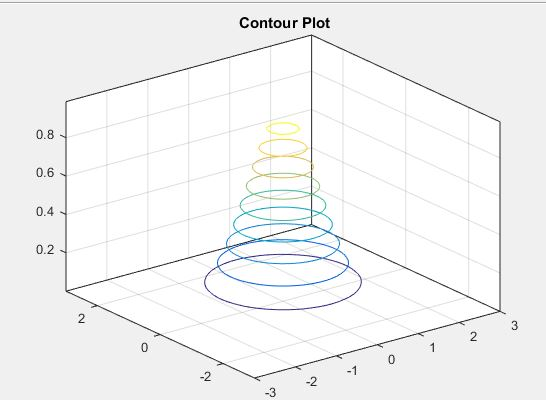
Let us consider a function to plot the contour plot

[x,y] = peaks(40);

z = exp(-x.^2-y.^2);

contour3(x,y,z);

title(‘\bf Contour Plot’)

Slice three-dimensional plot:

In order to plot a slice 3d plot we have to know the volumetric data (v) and three dimension coordinates specifications i.e., x,y,z

When you writing a matlab for slice plot when compared with normal 3d plot there will be quite difference between them. i.e., you need to specify each coordinate value. Syntax of slice 3d plot is

slice(x,y,z,v,xslice,yslice,zslice)

slice(v,xslice,yslice,zslice)

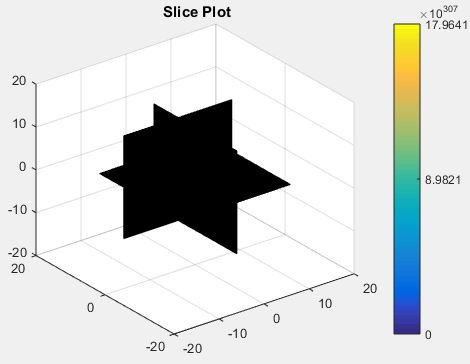
Now let us draw a slice for given mathematic equation.

[x,y,z] = meshgrid(-12:.1:12);

v = [exp((x.^2)-(y.^2)-(z.^3))];

xslice = 0.1;

yslice = 5;

zslice = 0;

slice(x,y,z,v,xslice,yslice,zslice)

colorbar

title(‘\bf Slice Plot’)

Differential Equation In Matlab:

Now let solve the differential equation in matlab by considering a simple command diff and pass the functions to solve the equations.

Let’s consider the function f(x)=4x2+3x-2

syms x

f = 4*x^2 + 3*x^(-2);

diff(f)

ans=8*x – 6/x^3

Some rules should be followed while solving differential equation, we can write f'(x) for a first order derivative and f”(x) for a second order derivative.

  1. For any functions f and g and any real numbers a and b are the derivative of the function: h(x) = af(x) + bg(x) with respect to x is given by: h'(x) = af'(x) + bg'(x).
  2. The sum and subtraction rules state that if f and g are two functions, f’ and g’ are their derivatives respectively, then, (f + g)’ = f’ + g’ (f – g)’ = f’ – g’.
  3. The product rule states that if f and g are two functions, f’ and g’ are their derivatives respectively, then, (f.g)’ = f’.g + g’.f.
  4. The quotient rule states that if f and g are two functions, f’ and g’ are their derivatives respectively, then, (f/g)’ = (f’.g – g’.f)/g2.
  5. The polynomial or elementary power rule states that, if y = f(x) = xn , then f’ = n. x(n-1). In this rule the direct outcome is that derivate of any constant is zero i.e., if y = k, any constant, then f’ = 0.
  6. The chain rule states that, the derivative of the function of a function h(x) = f(g(x)) with respect to x is, h'(x)= f'(g(x)).g'(x).

GRAPHICS IN MATLAB

0

GRAPHICS IN MATLAB

There are many different ways to manipulate graphics, for such the commands may include i.e., type help graphics for general graphics, while help graph2d is used for two dimensional command and for specialized and three dimensions the commands are help graphg3d, help specgraph.

Two-dimensional graphics:

Their two types of plotting in two dimensional graphs one is parametric and another one is contour or implicit plotting.

 Parametric plots:

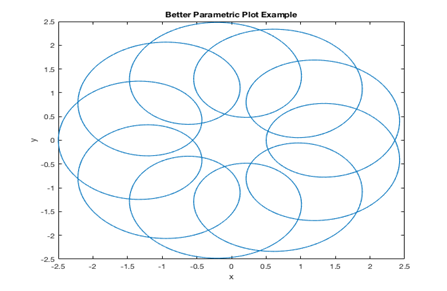
   In a parametric plot, you give both the x and y coordinates of each point as a function of a third parameter, let us consider the parametric example.

r= linspace(0,4*pi,1000)

x=1.5*cos(t)-cos(10*r);

y=1.5*sin®-sin(10*t);

plot(x,y);

x label(‘x’);

y label(‘y’);

title(‘better parametric plot example’)

Contour plot:

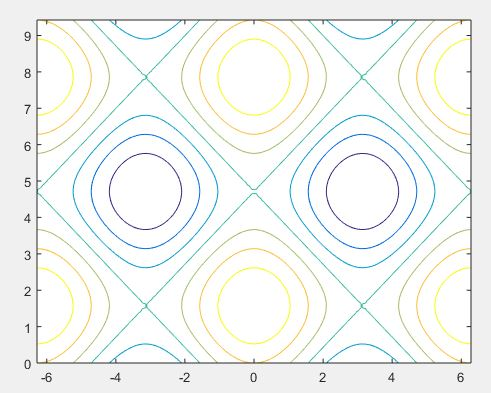
A contour of a function of two variables may be a curve along which the function features a constant value. Contour lines are used for creating contour maps by joining points of equal elevation above a given level, like mean water level.

A command meshgrid is used to provide grids for the rectangular regions. While the grid used by contour to produce the contour plot for the given region.

a= linspace(-2*pi,2*pi);

b = linspace(0,3*pi);

[a,b] = meshgrid(a,b);

C= cos(a)+sin(b);

contour(a,b,C)

Three dimensional plots:

In three dimensional plots they have three vectors in the same graph (x, y,z) mainly there are five different type of three dimensional plot in matlab. They are;

Mesh plot:

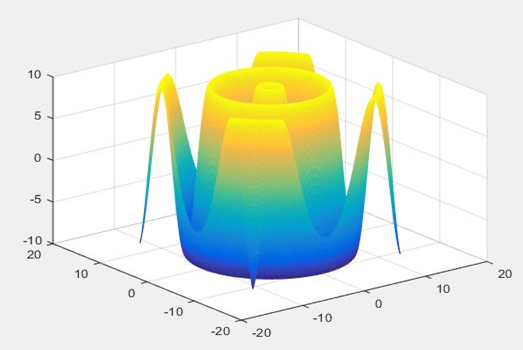
The mesh plotting function is employed to display the mesh plot. Which produces an wireframe surface where the lines connecting the defining points are colored.

 [x,y] = meshgrid(-12:0.1:12);

t = sqrt(x.^2+y.^2);

z =(10*sin(t));

mesh(x,y,z)

Surface three dimensional plot:

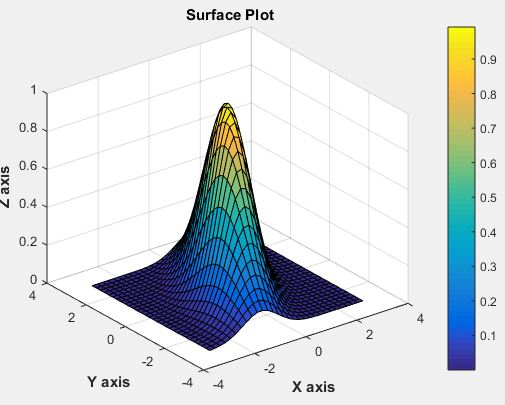
Which is similar to mesh plot main different between them is in surface path the convecting lines and faces will be displayed in dark color. Let us consider the example.

[x,y] = peaks(30);

z = exp(-0.7*(x.^2+0.5*(x-y).^2));

surf(x,y,z);

xlabel(‘\bf X axis’);

ylabel(‘\bf Y axis’);

zlabel(‘\bf Z axis’);

title(‘\bf Surface Plot’)

colorbar

Multiple Functions On the Same Graph

0

Multiple Functions On Same Graph:

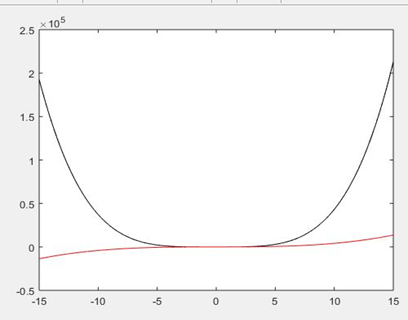
In matlab we can draw multiple functions on the same graph by considering some basic colors.

Colors                        code

White                           w

Blue                              b

Cyan                             c

Black                            k

Green                           g

Magenta                       m

Yellow                          y

Red                                r

Let us consider a script for two polynomials.

g(x)= 4x4+3x3+2x2+2x+9

h(x)=4x3+9x+2

x=[-15:0.01:15];

g=4*x.^4 + 3* x.^3 + 2 * x.^2 + 2 * x + 9

h=4 * x.^3 + 9 * x + 2;

Plot(x, g, ‘k’, x, h, ‘r’)

When you run the file you will output as shown in below.

AXIS SETTING:

In order to provide minimum and maximum values for x and y axis by considering the axis command. With axis command allow us to set axis scale.

Syntax will be:

axis ([xmin  xmax  ymin  ymax])

FOR GENERATING SUBPLOT:

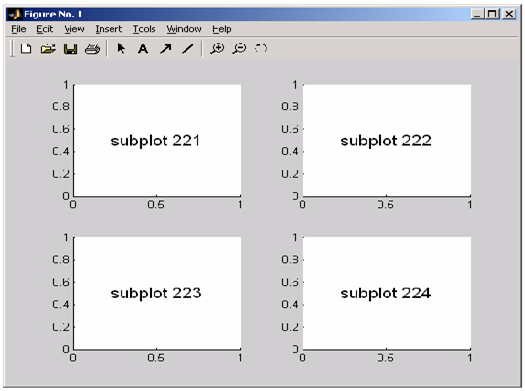
Subplot in matlab is used to divide the current figure and allow us to plot multiple figures in the m rows and n column.

Syntax for matlab

Subplot (m, n, p)

Let us consider a example for plotting

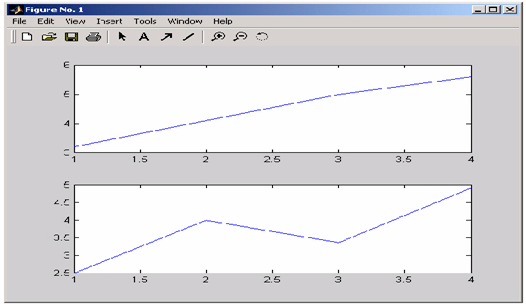
In order to plot the income in the top half of the figure and outgo in the bottom half of the figure,

      income = [3.2 4.1 5.0 5.6];
outgo = [2.5 4.0 3.35 4.9];
subplot(2,1,1); plot(income)
subplot(2,1,2); plot(outgo)

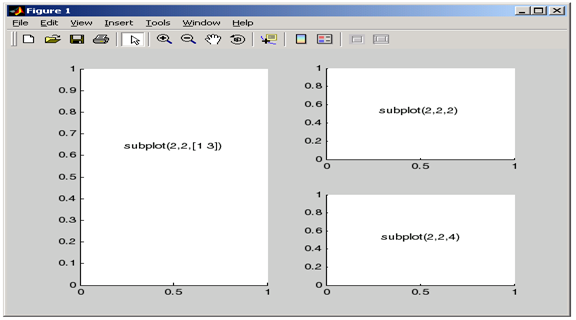
Below figure shows four subplot regions

The following combinations produce asymmetrical arrangements of subplots.

 subplot(2,2,[1 3])

subplot(2,2,2)

subplot(2,2,4)

IMPORT, EXPORT DATA IN MATLAB AND PLOTTING

0

IMPORTING DATA:

Where in Matlab importing data is defined as obtaining data from an external file. By using the importing data function we obtain data of different formats with various functions. There are four import functions in Matlab that are described as follows.

C= importdata (format): data from the file named as format is loaded in to the array C.

C=importdata (‘-pastespecial’): loading of records from the system clipboard in place of the document.

C= importdata (___, delimiterIn, headerlinesIn): In this function data is loaded from ASCll file, or clipboard, while the numerical reading starts from line headerlinesIn+1.

C= importdata (___, delimiterIn): In order to separate the column ASCII file or clipboard data we can use delimiterIn.

EXPORT DATA:

In matlab export data means write data in to the file. In matlab there various export data functions, Rectangular, delimited ASCII data file from an array. Diary (or log) document of keystrokes and the ensuing textual content output. Besides from the above there are another way to export a numeric array as a delimited ASCll data file:

With the help of save function we can specify the -ASCII qualifier using the dlmwrite function.

PLOTTING:

In order to plot a graph we use a graph function, to take the following steps:

To draw a graph we should outline the X values from the desired variety for which the graph is plotted.

Let us define the function by considering z=f(x)

Now let’s call plot command, as plot(x,y)

Let us plot simple function y=x for the value in the range of 0 to 200 with an increment in the value of 10.

X= [0:10:200];

z=x;

Plot(x, y)

ADDING TITLE, LABELS AND GRID LINES ON THE GRAPH:

In order to adjust the value in the graph we consider title labels and grid lines. The x label and y label instructions generate labels alongside x-axis and y-axis. The name command permits you to position a name at the graph. The grid on command permits you to position the grid traces at the graph.

concatenating, Determinant of a matrix, String:

0

Concatenating Matrices:

If you concatenate two matrices it creates a large matrix. Pair of square braces [] is a concatenate operator.

Matlab as two types of concatenate as follows:

Horizontal concatenation:

When you concatenate two matrix which are separated by using commas, they are called horizontal concatenation.

Vertical concatenation:

When you concatenate two matrix which are separated by using semicolon, they are called vertical concatenation.

Let us consider an example of this two concatenation:

a = [10 12 15; 14 8 6; 17 8 9]

b = [12 11 45; 8 1 -9; 18 2 11]

 c = [a, b]

d = [a; b]

Output will be obtained as

a= 10 12 15

     14 8 16

     17 8 9

b = 12 31 45

      8 0 -9

      45 2 11

 c = 10 12 15 12 11 45

       14 8   16   8   1 -9

       17 8   9   18 2 11

d=10 12 23

     14 8 6

     27 8 9

   12 31 45

   8 0 -9

   45 2 11

Matrix multiplication:

Where in matrix multiplication, the elements of rows in the first matrix is multiplied with the columns in the second matrix.

In matlab matrix multiplication is represented by ‘*’.

In matrix multiplication column in A matrix is equal to rows in B matrix.

Let us consider an example

a = [2 3 4; 1 2 3; 1 3 5]

b = [2 3 -1; 2 1 3; 5 0 -2;]

prod = a * b

Output will be

prod = 30 9 -1

           21 5 -1

           33 6 -2

Determinant of matrix:

Determinant of matrix is determined by using det function in matlab, and it represented of a matrix A is det(A). Let us consider an example.

a = [ 1 2 6; 2 3 4; 1 4 5]

 det(a)

output will be

ans =17

Inverse of Matrix:

The inverse of a matrix in matlab of A is represented by A−1 such which holds the following relationship:

AA−1 = A−1 A = 1

If the determinant of matrix is zero then the inverse will not exist and the matrix is singular.

Inverse of matrix is determined by inv function in matlab and it represented by inv(A)

STRING:

The string is really a vector whose additives are the numeric codes for the characters. Matlab has exclusive kind of textual content string.

Character array: best when considering individual letters of text, text is stored in two-dimensional array. The rule of all rows should have same number of column.

Cell array: best when considering word.

Let us create an uncomplicated string that may include a unique quote.

msg = ‘You”re right!’

            msg =

You’re right!

create the string, name, the usage of strategies of concatenation.

name = [‘Thomas’ ‘ R. ‘ ‘Lee’]

name = strcat(‘Thomas’,’ R.’,’ Lee’)

Create a vertical array of strings.

C = strvcat (‘Hello’,’Yes’,’No’,’Goodbye’)

C =

Hello 

Yes   

No    

Goodbye

Create a cell array of strings.

S = {‘Hello’ ‘Yes’ ‘No’ ‘Goodbye’}

S =

    ‘Hello’    ‘Yes’    ‘No’    ‘Goodbye’

MATRIX OPERATIONS

0

Deleting row or column in matrix:

An empty braces [] will define the entire row and column of a matrix is deleted. Let us consider an example deleting 2nd row of the:

 a = [3 4 5 6 7; 2 3 4 5 6; 1 2 3 4 5;  4 5 6 7 8];

a ( 2 , : ) = []

if we want to delete the 3rd  column of the given example

a = [2 3 4 5 6; 1 2 3 4 5; 3 4 5 6 7; 4 5 6 7 8];

a(: , 3)=[]

Matrix Operation:

Now let us discuss some commonly used matrix operations are:

Addition and subtraction of matrix:

While performing matrix addition and subtraction when both the operand of matrices must have same number of rows and columns.

Let us consider an example

a = [2 1 3; 4 5 6; 7 8 9];

b = [4 5 6; 1 2 3; 7 8 9];

c = a + b

a = [3 2 4; 4 5 6; 7 8 9];

b = [2 1 3; 3 2 1; 4 5 6];

d = a – b

If we run script file we get:

c= 6 6 9

     5 7 9

     14 16 18

d= 1 1 1

     1 3 5

      3 3 3

Division of (right, left) matrix:

If we want to perform the division of two matrices left (\) or right (/) division operation, when both the operand of matrices must have same number of rows and columns.

Now let us consider an example:

a = [1 2 3; 4 2 6; 7 5 2];

 b = [3 5 6; 2 3 8; 5 7 2];

 c = a / b

d = a \ b

If we run the above example we get output as:

c = -0.7916   0.1666   0.2083

      1.0833   4.3333   0.9166

       2.9583 4.6666   3.8333

 d =

-3.27778   -1.05556   -4.86111

 -0.11111   0.11111   -0.27778

 3.05556      1.27778   4.30556

Transpose of matrix:

The transpose operation will be defined as switching of the rows and columns in a matrix. And it will be represented as a single quote (‘).

Let us consider example:

a = [11 12 13; 14 8 6; 27 8 9]

b = a’

It displayed has:

a = 11 12 13

      14 8   6

      27 8   9

b = 11 14 27

       12 8   8 

       13 6   9

MATLAB ARRAYS

0

Array:

All the variables in matlab are arrays. A scalar is an array with one element, where as a array with one row and one column is called vector. An array with multiple rows and columns is called matrix.

Simply an array of order M x N with a set of number is arranged in a rectangular block of M horizontal rows and N vertical columns.

Creating one dimension array:

 One dimension array defined as numbers are listed in one row and one column, simply known as vector. Then the ith element of a vector k= [k1 k2 k3 k4 … kn]

  Row vector:

    In order to create a row vector provide the space or comma between the elements inside the brackets;

dates = [1     4    10    17    25]

             Or

dates = [1, 4 ,10,17,25]      

Column Vector: In order to create a row vector provide the semicolon between the elements inside the brackets;

Value= [127; 130; 136; 145; 158; 178; 211]

In colon notation, the first number defines the starting values, whereas the second number defines spacing and last number defines ending value.

Value= 2:2:10

Creating a two-dimensional array:

In these the number of rows are equal two number of columns, A matrix is created with the aid of using assigning the elements of the matrix to a variable. This is carried out with the aid of using typing the elements, row with the aid of using row,  within inside the square brackets [ ].

First kind the left bracket [, then type the first row separating the elements with spaces or commas. In order type, the text in the next row types a semicolon or press Enter. Type the right bracket] on the stop of the final row.