Saturday, May 2, 2026
Home Blog Page 10

Installation of PyCharm IDE for Mac, Windows and Linux

0

Installation of PyCharm IDE

  1. Navigate to official Pycharm websitehttps://www.jetbrains.com/pycharm..\Downloads\latest and download Pycharm .
  2.  Run the exe file to Install PyCharm  and you can also install PyCharm on windows manually by configuring PyCharm location on your c drive or change location of PyCharm .
  3. You can effortlessly configure PyCharm on windows 10 and to code in python you need to install PyCharm in windows 10 depending up on your system compatibility if its 32 but 0r 64 bit.
  4.  PyCharm is not only the IDE through which you can execute python code in windows 10 but    PyCharm is the most widely used IDE or integrated development environment for Python & compatable and will execute complex python code easily. 
  5. PyCharm  is accesable in three editions  ProfessionalCommunity, and Edu. It offers to download in 32 bit and 62 bit for windows 10 and also you can install pycharm on your mac by downloading .dmg file.

How to install Pycharm on Windows

The following is the step by step procedure to install Pycharm in windows 10

  1. To download and install Pycharm go to the official website https://www.jetbrains.com/pycharm.
  2. Download the community version

Install the downloaded file.

How to install Pycharm in Mac?

The following is the step by step procedure to install Pycharm for Mac

  1. Navigate to the official website and download the .dmg file.
  2. Install the downloaded file.

How to install Pycharm in Linux?

1. Go to the official website of Pycharm

2.  click on the Linux OS and download.

3. Install the downloaded file.

Installation of Python for Mac and Windows OS

0

How to install python

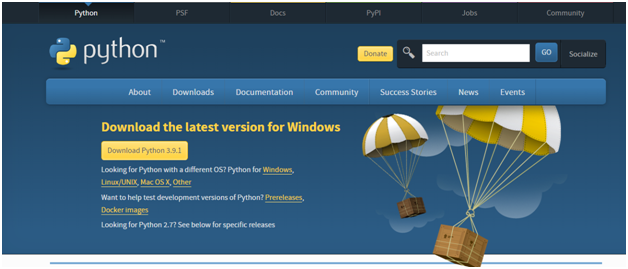
  1. Open the official website of python  i.e., https://www.python.org
  2. Go to downloads https://www.python.org/downloads
  1. Download the latest version of python depending on your OS.
  2. Install the downloaded file.
 Downloading Python for Mac OS

  1. Open the official website of Python and click on the type of OS and download the latest release.
  2. Install the downloaded file.
Downloading Python for Windows

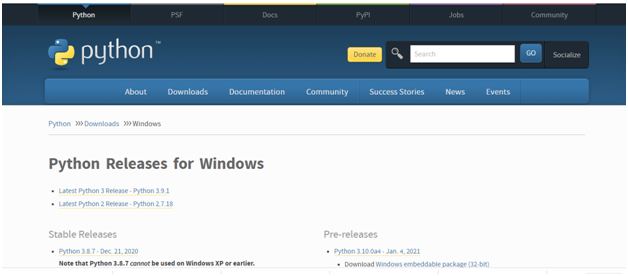
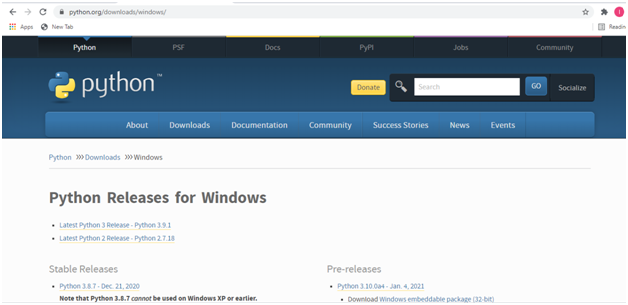
  1. Go to official website of python as suggested above and click on windows OS and download the latest release.
  2. Install the  downloaded file.
Introduction, uses and features of Python programming

0

What is python programming?

  • Python is a high level dynamically typed and interpreted object oriented high level programming language
  • Though there are many programming languages  in the market like C, C++,  java, java script python has its own popularity.
  • Though python came into light before java but it has not acquired the identification that it has today.  Python was developed by Guido Van Rossum and released in 1991.
  •   But for beginners of programming the programming language must be easier to understand python is such easiest language to learn..
  •  With the development of machine learning, Python has grasped more attention for  researchers as it is the easiest language for programming.

Use of python Programming?

  • Python  programming is used to create web applications.
  • Python programming is used to create workflows.
  • Python programming  is used for production ready software development and  rapid prototyping.
  • Python programming is capable of handling big data and also performs complex mathematical computations.
  • With the python programming one can connect to database systems.
  • Python can also be capable of reading and modifying the files.

Features of python:

Easy to use:

Python is easy to use and learn .It has simple structure, understandable syntax and developer friendly.

Multi-platform language:

Python can run on any platform such as Linux, windows, Unix etc.,

Open source software:

Python is an open source software available to everyone.

GUI programming:

Python is used for developing GUI(Graphical User Interface) applications.

Extensible:

This means that low level languages like C, C++, can be used to compile the code.

Integrated:

Python can be easily integrated with other languages like C, C++ Java.

Wide Frameworks and Libraries:

Python has wide range of libraries and frameworks for application developments.

Object oriented:

Python is an Object Oriented Programming language with classes and object concepts.

Sampling Theorem Verification, Noise removal by using cross-correlation/autocorrelation

0

Sampling theorem:

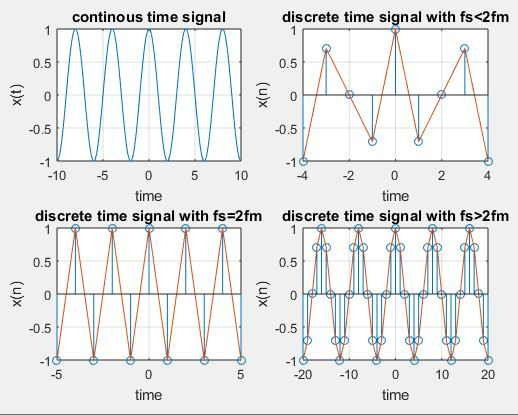
Sampling theorem is used to convert analog signal into discrete time signal.it has applications in digital signal processing and digital communication. Sampling theorem is determined has that if the sampling rate in any pulse modulation system exceeds twice the maximum frequency of the message signal, with this the receiver will reconstructed the signal with minimum distortion.

Whereas,

 fs is the sampling rate

fm is the maximum frequency of message signal

Then sampling theorem can be expressed in mathematical form as

Fs≥ 2fm

Well 2fm is determined as Nyquist rate.

It the condition is

Fs≤2fm

It is defined as aliasing effect it occurred when the sampling rate is less than twice the maximum frequency of the message signal.

Fs=sampling rate

Program:

clc;

clear all;

close all;

t=-10:.01:10;

T=4;

fm=1/T;

x=cos(2*pi*fm*t);

subplot(2,2,1);

plot(t,x);

xlabel(‘time’);

ylabel(‘x(t)’);

title(‘continous time signal’);

grid;

n1=-4:1:4;

fs1=1.6*fm;

fs2=2*fm;

fs3=8*fm;

x1=cos(2*pi*fm/fs1*n1);

subplot(2,2,2);

stem(n1,x1);

xlabel(‘time’);

ylabel(‘x(n)’);

title(‘discrete time signal with fs<2fm’);

hold on;

subplot(2,2,2);

plot(n1,x1);

grid;

n2=-5:1:5;

x2=cos(2*pi*fm/fs2*n2);

subplot(2,2,3);

stem(n2,x2);

xlabel(‘time’);

ylabel(‘x(n)’);

title(‘discrete time signal with fs=2fm’);

hold on;

subplot(2,2,3);

plot(n2,x2)

grid;

n3=-20:1:20;

x3=cos(2*pi*fm/fs3*n3);

subplot(2,2,4);

stem(n3,x3);

xlabel(‘time’);

ylabel(‘x(n)’);

title(‘discrete time signal with fs>2fm’)

hold on;

subplot(2,2,4);

plot(n3,x3)

grid;

Noise removal by using cross-correlation/autocorrelation

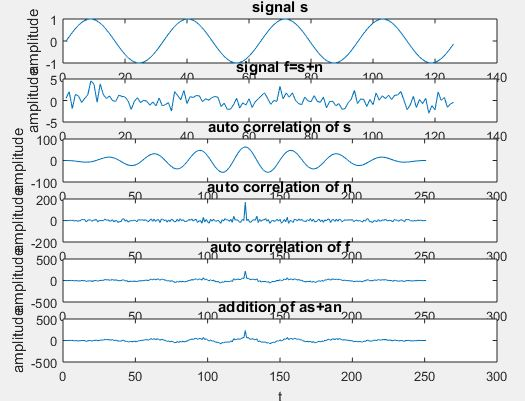
Detection of the periodic signal conceal by random noise is of great importance .The noise signal encountered in practice may be a signal with random amplitude variations. A signal is uncorrelated with any periodic signal. If s(t) is a periodic signal and n(t) is a noise signal then.

clc;

clear all;

close all;

t=0:0.2:pi*8;

%input signal

s=sin(t);

subplot(6,1,1);

plot(s);

title(‘signal s’);

xlabel(‘t’);

ylabel(‘amplitude’);

%generating noise

n = randn([1 126]);

%noisy signal

f=s+n;

subplot(6,1,2)

plot(f);

title(‘signal f=s+n’);

xlabel(‘t’);

ylabel(‘amplitude’);

%autocorrelation of input signal

as=xcorr(s,s);

subplot(6,1,3);

plot(as);

title(‘auto correlation of s’);

xlabel(‘t’);

ylabel(‘amplitude’);

%autocorrelation of noise signal

an=xcorr(n,n);

subplot(6,1,4)

plot(an);

title(‘auto correlation of n’);

xlabel(‘t’);

ylabel(‘amplitude’);

%autocorrelation of transmitted signal

cff=xcorr(f,f);

subplot(6,1,5)

plot(cff);

title(‘auto correlation of f’);

xlabel(‘t’);

ylabel(‘amplitude’);

%autocorrelation of received signal

hh=as+an;

subplot(6,1,6)

plot(hh);

title(‘addition of as+an’);

xlabel(‘t’);

ylabel(‘amplitude’);

Different Types Of Connecting Devices

Connecting Devices:

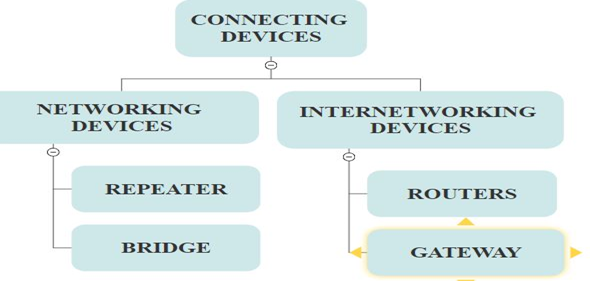
Based on high level, the connecting devices is classified into networking devices and internetworking devices. In this the repeaters are used in physical layer for providing electrical specifications for the signals.

Whereas bridges are used in the data link layer and physical layer for addressing protocols and routers will be used at the network layer which is useful for providing internetworking between compatible networks. As well as gateways are used at all layers in the OSI model for providing translation services between incompatible networks.

Repeater:

In osi reference architecture a repeater is used at physical layer in order to regenerates the signal for electronic devices.signal travelling across a physical wire travel some distance before they become weak, or corrupted as other signals noise interfere. A repeater receives such signal, which is weak or corrupted and regenerates the signal.

Working of the repeater:

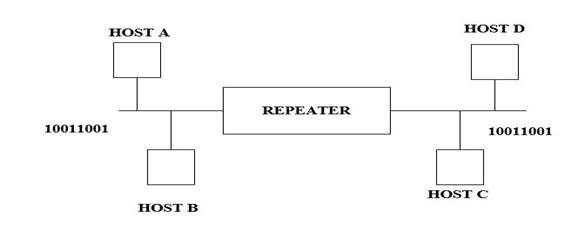
For instance let us consider a sample network (LAN), in this host A wants to send a packet having the bit stream 10011001 to host D. let check once the two hosts are on the same LAN, but on different portion of the LAN. When the host A sents a signal to host D the signal may becomes weak, with this the host D may not able receive the same signal it may get corrupted as 10011011 before it reaches to host D. however, even before this can happen, at the lowest level, the repeater simply prevents this from occurring by taking the input signal corresponding to bits 1001100. Regenerating it to make a sign with an equivalent bit format and therefore the original signal strength, and sending it forward.

Bridge:

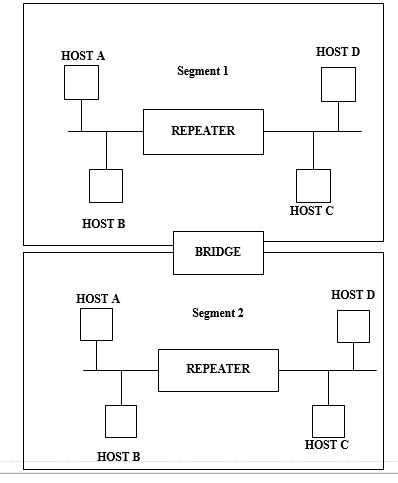
It is operated at both physical and datalink layer of the OSI protocal hierarchy. Bridge consisting of computer with it’s own processor and memeory card, two NIC cards to connect to two portions of a network.

The main intention behind using a bridge is to divide the entire larger network into smaller subnetworks, known as segments.

Purpose switching to bridge:

Unnecessary traffic is minimized, links in errors are identified and isolated so that the traffic does not go through it. Security features or access control can be implemented.

Routers:

Router is operated at three layers in OSI model,which routes the packets based on their logical address.router normally used to connect LAN and WAN in the inernet and routing table is used to take decisions about the routes. They are usually dynamic and require routing protocals in order to update.

Gateway:

Gateway is operated at the seven-layer in the OSI model and five layers on the internet. A gateway takes an application message, read it, and interrupt it. It can be used as a connecting device between two internetworks that use two different models. Let’s consider an example, well a network is designed to use an OSI model that can be connected to another network using the internet model.

TO PLOT POLES AND ZEROS OF THE GIVEN TRANSFORM FUNCTION

0

Z TRANSFORM

 For discrete time linear time-invariant system with impulse response h[n], the response y[n] of the system to a complex exponential input of the form z-1 is

Y[n] =H[z].zn

Where H[z] =  zn                  ——-2

For z=ejw with  real (i.e., with |z| =1), the sum in above equation corresponds to the discrete-time Fourier transform of h[n].

Generally, when |z| is not restricted to unity, then summation in equation 2 is referred as z transform of h[n].

Z transform for the discrete time signal x[n] is determined as

X[z] =  zn          

Where, z= a complex variable.

Program:

clc;

clear all;

close all;

%enter the numerator and denominators coefficients in square brackets

num=input(‘enter numerator co-efficients’);

den=input(‘enter denominator co-efficients’);

% find poles and zeros

poles=roots(den)

zeros=roots(num)

% find transfer function H(s)

h=tf(num,den);

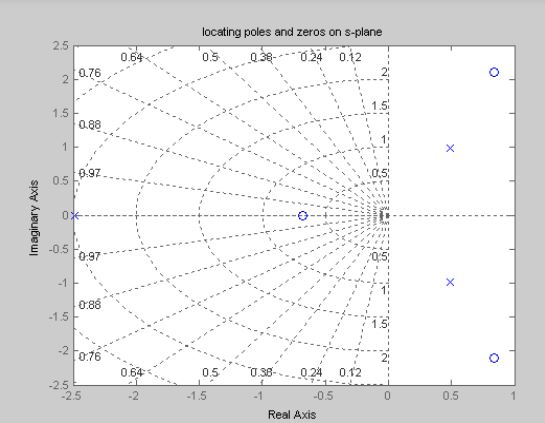
% plot the pole-zero map in s-plane

sgrid;

pzmap(h);

grid on;

title(‘locating poles and zeros on s-plane’);

%plot the pole zero map in z-plane

figure

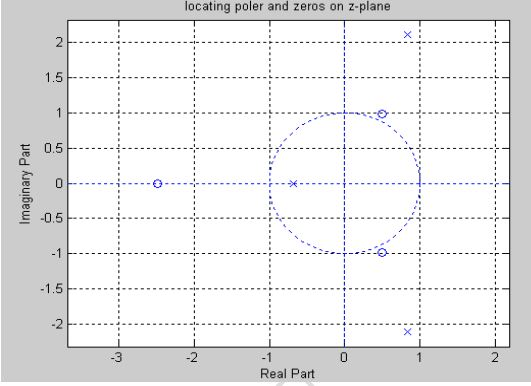
zplane(poles,zeros);

grid on;

title(‘locating poles and zeros on z-plane’);

Output:

Enter numerator co-efficients [2 -12 4 5]

Enter denominator co-efficients [3 4 5 6]

Poles =

  -1.2653 + 0.0000i

  -0.0340 + 1.2568i

  -0.0340 – 1.2568i

Zeros =

    5.5594

    0.9262

   -0.4855

  • GAUSSIAN NOISE:

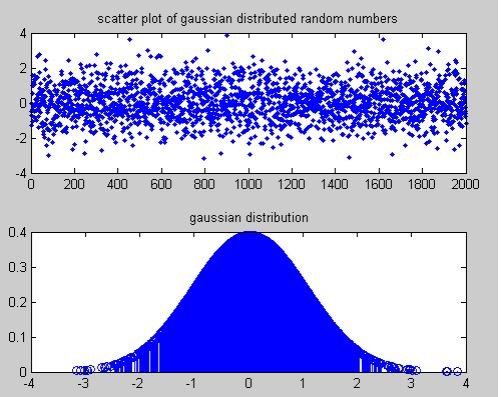
Gaussian noise will be defined as statistical noise which features a probability density function of the traditional distribution (also referred to as Gaussian distribution). In other words, the valuestha the noise can combat are Gaussian-distributed. It is most ordinarily used as additive noise to yield additive white Gaussian noise (AWGN). Gaussian noise is correctly defined because of the noise with a Gaussian amplitude distribution.

Program:

clc;

clear all;

close all;

%let’s generates the given set of 2000 samples for Gaussian distributed random numbers

x=randn(1,2000);

%to plot the joint distribution for both the sets using dot.

subplot(211)

plot(x,’.’);

title(‘scatter plot of gaussian distributed random numbers’);

ymu=mean(x);

ymsq=sum(x.^2)/length(x);

ysigma=std(x);

yvar=var(x);

yskew=skewness(x);

p=normpdf(x,ymu,ysigma);

subplot(212);

stem(x,p);

title(‘ gaussian distribution’);