Thursday, March 5, 2026
Home Blog Page 5

How to Enable Debug Mode in WordPress

0
  • To Enable Debug Mode in WordPress -> Open wp-config file in your root folder -> define( ‘WP_DEBUG’, true ); and save wp-config file.

If you are having issue with your wordpress website and wordpress is showing blank page or white screen of death on wordpress is responding in an unexpected way and you dont know whats happening with your wordpress website as everything seems to be working fine and well connected with database in wp-config file and no issues with htaccess redirects as well then you need to enable debug mode in wordpress in wp-config.php file and rectify the error in wordpress.

Note: Enabling debug mode will display all errors in the front end and warnings and notices as well on your front end website. (which will be seen by users as well). You need to check with the errors and disable debug mode on wordpress once you fix errors.

How to enable Debug Mode in WordPress

Make these below changes in your wordpress wp-config file and it will enable debug mode.

Step 1: Go to your root website folder on your wordpress

Step 2: Now, locate wp-config.php file

Step 3: Open it with your favorite editor (sublime or notepad or any other editor).

Step 4: In wp-config.php file place this code -> define( ‘WP_DEBUG’, true ); and save  and close wp-config file.

That’s it, this is how you enable   debug mode in wordpress website and fix errors on wordpress.

Enable Debug Mode on WordPress -GoDaddy

The process is pretty simple and all you need to do is define wp_debug to true to enable debug mode on wordpress -godaddy.

Before making any changes to wp-config file, it’s recommended to take a backup of your wp-config file and if anything goes wrong you can replace it with the previous version of wp-config file.

Step 1: Login to your go daddy account and navigate to my products

Step 2: Go to cPanel -> Locate file manager and click on it which will open the folder structure of your website.

Step 3: Now, take a backup of the wordpress website or wp-config.php file to your computer.

Step 4: Now, click on wp-config.php file and click on edit

Step 5: At the bottom of wp-config.php file -> define( ‘WP_DEBUG’, true ); and save wp-config file.

That’s it, this is how you enable debug mode on wordpress godaddy website.
AMPS operation

AMPS operation:

A simple diagram of how AMPS system handles various calls and other responsibilities as shown in below diagram. As the power up, all mobile station is in the range of a base station which go through a registration with AMPS before actual service starts. According to the state of the system, the incoming and outgoing calls are handled. When handoff has occurred to the adjacent cells mobile station will undergo the registration process.

To perform various functions in AMPS three identification numbers are required they are:

Electronic serial number (ESN):

A 32-bit binary number uniquely identifies a cellular unit or mobile station and established by the manufacturer at the factory. Therefore it is unique, any mobile station will be identified by using this number. For some security reasons, this number should not be alterable and should be present in all mobile stations.

System identification number (SID):

A 15-bit unique binary number assigned to a cellular system. Every cellular system is assigned with a system identification number which is used by all mobile stations registered in the service area this number is given by the Federal communication commission (FCC). This number is given to the mobile station for transmitting data which handles the calls. The SID serves as a check and can be used in determining if a particular mobile station is registered in the same system.

Mobile identification number (MIN):

Where the particular location of the mobile station is not predictable. With this, a question arises how a mobile station knows when it receives a call. The answer for this is the message passed on the control channels. Whenever the mobile station is not in service, it tunes to the strongest channel to find out useful control information. The same happens at the base station as well. There are two important control channels: reverse control channels (ROCC from base station to mobile station, and forward control channels from mobile station to base station both are operating at 10kbps (FOCC).

Interpolation Process Implementation and I/D sampling rate convertor implementation

Interpolation Process Implementation:

Theory:

“Upsampling” is defined as the process of inserting zero-valued samples between original samples to increase the sampling rate. (This is called “zero-stuffing”.) . “Interpolation”, is determined as the process of upsampling followed by filtering. The filtering removes the undesired spectral images. The main reason for interpolating is simply used to maximize the sampling rate at the output of a particular system so that another system operating at a better rate can input the signal.

Steps to perform interpolation process:

Step I: Let’s define up sampling factor and input frequencies f1 and f2

Step II: Now represents the input sequence with frequencies f1 and f2

Step III: In order to perform the interpolation on input signal by using the matlab command interp.

Step IV: Next to plot the input and output signal/sequence.

Program:

clc;

clear all;

close all;

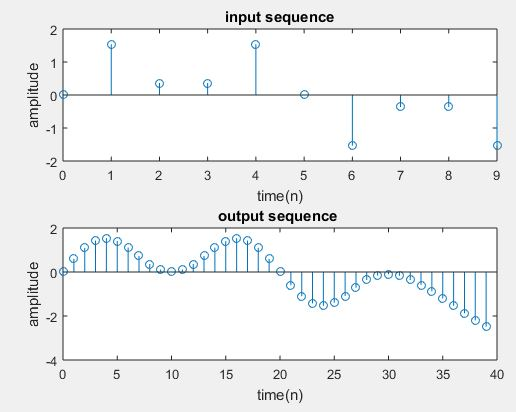
L=input(‘enter the upsampling factor’);

N=input(‘enter the length of the input signal’); % its Length should be always greater than 8

f1=input(‘enter the frequency of first sinusoidal’);

f2=input(‘enter the frequency of second sinusoidal’);

n=0:N-1;

x=sin(2*pi*f1*n)+sin(2*pi*f2*n);

y=interp(x,L);

subplot(2,1,1)

stem(n,x(1:N))

title(‘input sequence’);

xlabel(‘time(n)’);

ylabel(‘amplitude’);

subplot(2,1,2)

m=0:N*L-1;

stem(m,y(1:N*L))

title(‘output sequence ‘);

xlabel(‘time(n)’);

ylabel(‘amplitude’);

Output:

enter the upsampling factor4

enter the length of the input signal10

enter the frequency of first sinusodal0.1

enter the frequency of second sinusodal0.3

I/D sampling rate convertor implementation:

Steps to perform the I/D sampling rate conversion:

Step I: Let’s define the upsampling factor, downsampling, and input frequencies f1 and

 f2

Step II: Let’s represent the input sequence with frequencies f1 and f2

Step III:  In order to perform I/D sampling rate conversion on the given input signal by using Matlab resample.

Step IV: To plot the input and output signal/sequence.

Program:

clc;

clear all;

close all;

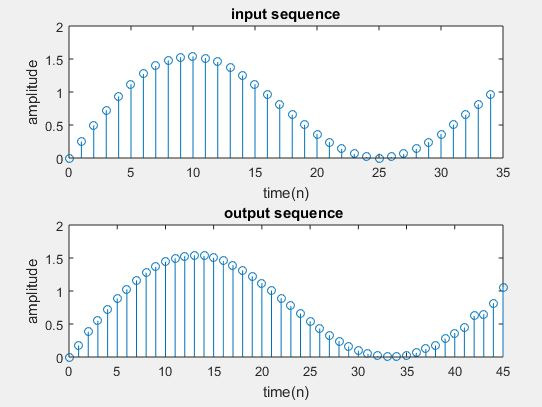
L=input(‘enter the upsampling factor’);

D=input(‘enter the downsampling factor’);

N=input(‘enter the length of the input signal’);

f1=input(‘enter the frequency of first sinusoidal’);

f2=input(‘enter the frequency of second sinusoidal’);

n=0:N-1;

x=sin(2*pi*f1*n)+sin(2*pi*f2*n);

y=resample(x,L,D);

subplot(2,1,1)

stem(n,x(1:N))

title(‘input sequence’);

xlabel(‘time(n)’);

ylabel(‘amplitude’);

subplot(2,1,2)

m=0:N*L/D-1;

stem(m,y(1:N*L/D));

title(‘output sequence ‘);

xlabel(‘time(n)’);

ylabel(‘amplitude’);

output:

enter the upsampling factor4

enter the downsampling factor3

enter the length of the input signal35

enter the frequency of first sinusodal0.01

enter the frequency of second sinusodal0.03

Introduction of advanced mobile phone system (AMPS)

Introduction to some existing wireless systems:

For wireless system we consider many factors as its needs such as call duration, traffic in adjacent cell, call rate, atmosphere condition and the terrain. Various characteristics are important to get an idea about how wireless system will work in the real-world for the existing cellular system and how it support the mobile communication. In order to emphasis the communication between the sender and the receiver it should follow some set of rules called communication protocols. For facilitating easy transfer of information there are some steps for open system interconnection (OSI) and international organization for standardization (ISO).

Introduction of advanced mobile phone system (AMPS):

AMPS is the first cellular system used in United States. It uses FM modulation technique for transmitting speech signal, one of the important property is control information was transmitted in digital form using FSK. Which is created by AT&T Bell Labs with the key idea of splitting the entire service area into logical division is called cell. And the divided cell is allocated with specific band from the frequency spectrum.

While AMPS uses the cell radius upto 1 to 16 miles, depending on different factors such as traffic density and density of users. Smaller cells have less thermal noise and more interference and larger cells have more thermal noise and less interference. One of the most important consideration of AMPS is it allows both cell sectoring and splitting.

Some characteristics of AMPS:

The frequency band used in AMPS between 824 MHz to 849 MHz for transmission from reverse link and the frequency band used in the forward link is 869 MHz to 894 MHz.  Manchester frequency modulation is used for transmitting data at the rate of the 10kbps, while the control parameters remains the same as in voice transfer.

For transmitting control information and data separate channels are used some control messages are exchanged between the mobile station and the base station has compared with data or voice messages, a smaller number of control channels are employed than voice antennas.

In AMPS the frequency allocation is done by splitting the entire frequency spectrum into two bands B and B and B and A.

Decimation process implementation

Decimation process implementation:

Theory:

“Decimation” is that the process of reducing the rate.

“Down sampling” may be a more specific term that refers to only the method of throwing away samples, without the low pass filtering operation. The most important reason to decimate is simply to reduce the sampling rate at the output of 1 system so a system operating at a lower rate can input the signal. But the away more common motivation for decimation is to scale back the value of processing: the calculation and the memory required to implement a DSP system generally is proportional to the rate, therefore the use of a lower rate usually leads to a cheaper implementation.

Steps involved in performing decimation process:

Step I: let’s define down sampling factor and input frequencies f1 and f2

Step II: And Represent input sequence with frequencies f1 and f2

Step III: To perform the decimation on input signal by using MatLab command decimate.

Step IV: Next plot the input and output sequence.

Program:

clc;

clear all;

close all;

D=input(‘enter the down sampling factor’);

L=input(‘enter the length of the input signal’);

f1=input(‘enter the frequency of first sinusoidal’);

f2=input(‘enter the frequency of second sinusoidal’);

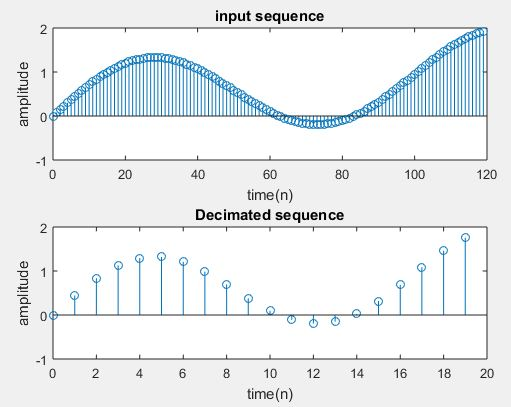
n=0:L-1;

x=sin(2*pi*f1*n)+sin(2*pi*f2*n);

y=decimate(x,D,’fir’);

subplot(2,1,1);

stem(n,x(1:L));

title(‘input sequence’);

xlabel(‘time(n)’);

ylabel(‘amplitude’);

subplot(2,1,2)

m=0:(L/D)-1;

stem(m,y(1:L/D));

title(‘Decimated sequence’);

xlabel(‘time(n)’);

ylabel(‘amplitude’);

Output:

enter the down sampling factor6

enter the length of the input signal120

enter the frequency of first sinusodal0.002

enter the frequency of second sinusodal0.01

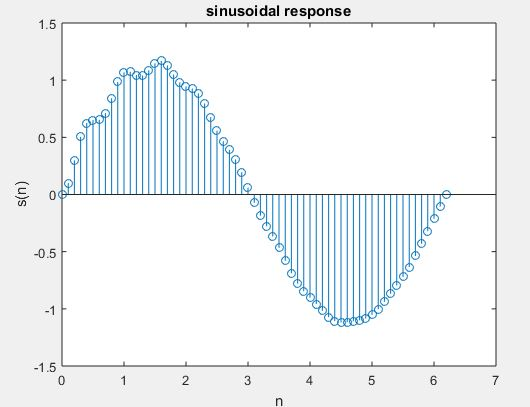
SINUSOIDAL SIGNAL GENERATION THROUGH FILTERING PROCESS:

One of the most important applications of an LTI discrete-time system is to pass certain frequency components in an input sequence with no distortion and block other frequency components. Such systems are called digital filters. The key to the filtering process is the inverse Discrete Fourier transform, which expresses an arbitrary input sequence as a the linear weighted sum of an infinite number of exponential sequences, or equivalently, as a the linear weighted sum of sinusoidal sequences. As a result, by appropriately choosing the values of magnitude function of the LTI digital filter at frequencies like the frequencies of the sinusoidal components of the input, a number of these sinusoidal sequences can be selectively heavily attenuated or filtered with reference to the others.

Program:

close all;

clear all;

clc;

b=[1];

a=[1,-1,0.9];

 n=[-20:120];

 t=0:0.1:2*pi;

 x=sin(t);

 s=filter(b,a,x);

 stem(t,s);

 title(‘sinusoidal response’);

 xlabel(‘n’);

 ylabel(‘s(n)’);

Connections in cellular telephone system:

The three subsystems of the cellular system are connected using high speed data links.

The mobile unit and cell site are connected through radio link that conveys the voice and signaling information between them.

The channel used by each mobile unit for communication is not fixed, the channel can be any one in the complete bandwidth allocated by the serving area .But only a single channel is used at a time to convey information between two entities.

                A standard Common Air Interface (CAI)carries out the communication between the mobile and  base-station or cell unit with the help of four different channels. They are :

  1. Forward Voice Channels:

This channel is used to transmit the voice signal to mobile from cell unit.

2. Reverse Voice Channels:

This channel transmits the voice channels from mobile unit to base station.

3. Forward Control Channels:

This channel initiates the cells at base station. As this channel continuously broadcasts all of the traffic requests of all the mobiles in the system, it can also be used as beacons.

4. Reverse Control Channel  :

This channel initiates the calls at mobile unit.

The control channels only deal with the setting up of a call and transferring it to the vacant channel. Hence , these are also called as setup channels.

These channels transmit and receive the  data that uphold call setup and service requests. When there is no call in progress, mobile unit handles the channels.

Working of cellular telephone system

Cellular Telephone System

  Cellular system  accommodate a large number of users over a large geographic area, within a limited frequency spectrum and provide high quality service that is often comparable to that of the land line telephone system.

 High capacity is achieved by limiting the coverage area of each base station transmitter to a small geographic area called ‘cell’ so that  another base station reuses the  same radio channels  located some distance away.

 A sophisticated switching called a handoff enables a call to proceed uninterrupted, when the user moves from one cell to another.  A wireless connection  is provided by the system  to the PSTN for any user location within the radio range of the system.

Working of Cellular telephone system

Cellular Telephone system consists of three sub-systems they are

1.            Mobile unit

2.            Cell site

3.            Mobile Telephone Switching Office

All these three sub-stations are joined using high-speed data links.

Mobile unit:

This subsystem encompasses a control unit, a transceiver to transmit an receive signals and an antenna to radiate signals.

Cell Site:

This part of the cellular system  acts as an interface between mobile telephone switching center and the mobile unit. It encompasses all the elements of a mobile unit  in addition, it has radio cabinets , power plant and data terminals.  

Mobile Telephone Switching Office:

The MTSO is the most important cooperating element for all cell sites in the cellular system. It has a cellular processor and cellular switch The switching office is linked to telephone company zone offices and its main function is to control call processing and manage billing activities. The cellular switch is used to connect one mobile subscriber to another mobile subscriber in the cellular mobile system. The voice trunks used by MTSO are similar to voice trunks used by telephone company zone offices. In addition, it has data links that imparts administration links between the processor and the cell sites and between processor and switch.

High pass FIR filter implementation and High pass IIR filter implementation

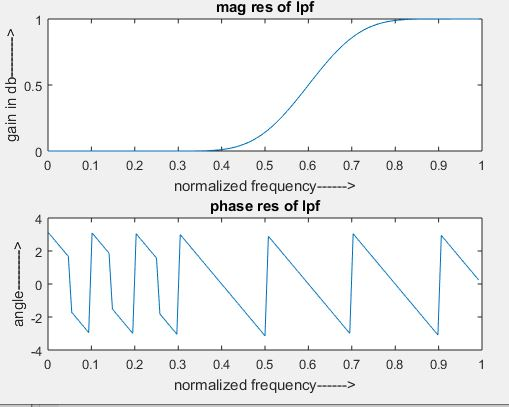
Steps involved in performing FIR filter operation

Step I: Let’s enter the pass band frequency (fp) and stop band frequency (fq).

Step II: And then get the sampling frequency (fs), length of window (n).

Step III: Next calculate cut off frequency.

Step IV: Use the boxcar, hamming, Blackman Commands for designing window.

Step V: And then design filter by using above parameters.

Step VI: To find frequency response of the filter by using matlab command freqz.

Step VII: Then plot the magnitude response and phase response of the filter.

Program:

clc;

clear all;

close all;

n=20;

fp=300;

fq=200;

fs=1000;

fn=2*fp/fs;

window=blackman(n+1);

b=fir1(n,fn,’high’,window);

[H W]=freqz(b,1,128);

subplot(2,1,1);

plot(W/pi,abs(H));

title(‘mag res of lpf’);

ylabel(‘gain in db——–>’);

xlabel(‘normalized frequency——>’);

subplot(2,1,2);

plot(W/pi,angle(H));

title(‘phase res of lpf’);

ylabel(‘angle——–>’);

xlabel(‘normalized frequency——>’);

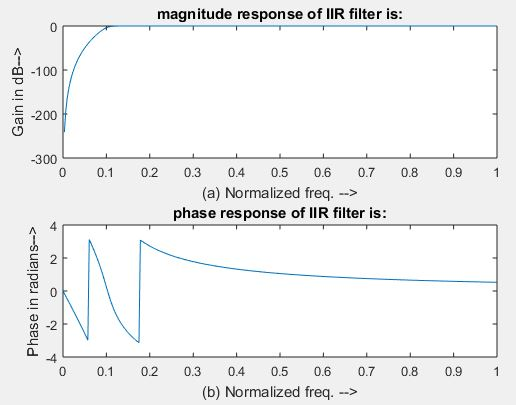
Steps involved in performing IIR filter operation

Step I: Now enter the pass band ripple (rp) and stop band ripple (rs).

Step II: while the pass band frequency (wp) and stop band frequency (ws).

Step III: Then Get the sampling frequency (fs).

Step IV: Then calculate the normalized pass band frequency, and normalized stop band frequency w1 and w2 respectively.

Step V : Make using the following function for calculating the Butterworth filter order [n,wn]=buttord(w1,w2,rp,rs ) and Chebyshev filter order [n,wn]=cheb1ord(w1,w2,rp,rs)

 Step VI: Let’s design the nth order digital high pass Chebyshev or Butterworth filter using the following commands. Butterworth filter [b,a]=butter (n, wn,’high’) Chebyshev filter [b,a]=cheby1 (n, 0.5, wn,’high’)

Step VII: In order to find the digital frequency response of the filter by using ‘freqz ( )’ function

Step VIII: Then calculate the magnitude for the frequency response in decibels (dB) mag=20*log10 (abs (H))

Step IX: Then plot the magnitude response [magnitude in dB Vs normalized frequency]

Step X: Next calculate the phase response using angle (H).

Step XI: Then plot the phase response [phase in radians Vs normalized frequency (Hz)].

Program:

clc;

clear all;

close all;

disp(‘enter the IIR filter design specifications’);

rp=input(‘enter the passband ripple’);

rs=input(‘enter the stopband ripple’);

wp=input(‘enter the passband freq’);

ws=input(‘enter the stopband freq’);

fs=input(‘enter the sampling freq’);

w1=2*wp/fs;w2=2*ws/fs;

[n,wn]=buttord(w1,w2,rp,rs,’s’);

disp(‘Frequency response of IIR HPF is:’);

[b,a]=butter(n,wn,’high’,’s’);

w=0:.01:pi;

[h,om]=freqs(b,a,w);

m=20*log10(abs(h));

an=angle(h);

figure, subplot(2,1,1);plot(om/pi,m);

title(‘magnitude response of IIR filter is:’);

xlabel(‘(a) Normalized freq. –>’);

ylabel(‘Gain in dB–>’);

subplot(2,1,2);plot(om/pi,an);

title(‘phase response of IIR filter is:’);

xlabel(‘(b) Normalized freq. –>’);

ylabel(‘Phase in radians–>’);

CELL CAPACITY

Cell traffic load is typically characterised has the two important distributed parameters.

  1. Average number of mobile stations requesting the service (average call arrival rate (λ).
  2. Average length of time the mobile stations requiring the service (average holding time T).

The offered traffic load is defined as                                        

a= λT.

For example, in a cell with 100ms, on average, if 30 requests are generated during an hour with an average holding time of T=360 seconds then the average call arrival rate is.     

λ =

A servicing channel that is kept busy in an hour is quantitatively defined as one ERLANG.

Here the traffic load offered for the example by ERLANG is        


             = 3 Erlang.

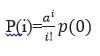
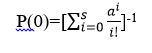
The average arrival rate is λ and the average departure rate is µ. Therefore all the channels are busy, for this arriving call is turned away. An M/M/S/S queuing model of the system can be analyzed. Since M/M/S/S is a special case of M/M/S/∞, steady-state probabilities p(i) for these systems have the same form as those for states i=0…S in the M/M/S/∞ model. Therefore, S is defined as the channels in a cell. Thus we have

 Where a= λ/µ is the offered load and

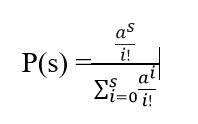
Therefore the arriving call probability p(s) blocked is equal to the probability of all the channels are busy, which is                                    

The above equation is called the Erlang B formula and is denoted by B(s, a). B(s, a). Therefore it also called blocking probability of rejection, or probability of loss.

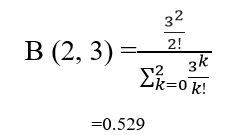
From the old example, if S is given as 2 with a=3, the blocking probability is

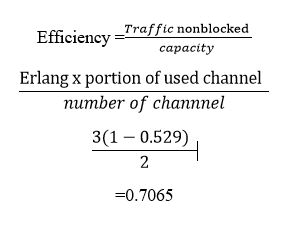
Therefore, a fraction of 0.529 calls is blocked, and that we got to reinitiate the decision. Thus the entire number of blocked calls is about 30*0.529=15.87. The efficiency of the system is often given by.

Evolution of mobile radio communication

  • The evolution of mobile radio communication throughout the world is beneficial. This is because it helps to understand the vast influence  of cellular radio and personal communication services over the next future decades. It helps to understand the variation in the evolution of wireless systems, services and technologies due to government regulatory agencies and service competitors. The progressive involvement of technology leads to growth and penetration of mobile market due to high cost and drastic changes in the technology. Wireless communication systems have been accepted by the subscribers at the rates comparable to the television and video cassette recorders.
  • Developments in mobile communications have been carried out slowly and then technical enhancements have been done. The wireless communication features were facilitated to entire public after the introduction of cellular concept by Bell laboratories in 1960’s and 1970’s.The future growth of mobile communication system depends on the allocation of radio spectrum advancement in technologies and regular decisions.
  • In the year1934, Amplitude Modulation (AM) mobile communication systems were utilized by 194 municipal police radio systems and 58 state police stations. The purpose of AM systems is to provide security for public in US. In the middle of 1930’s nearly 5000 radios were installed in mobiles , the users of which  suffered from vehicle ignition noise.
  • In the year 1935,FM was introduced by Edwin Armstrong in mobile communication system, which was then used as basic modulation technique in the world. Table below illustrates the growth and penetration of US mobile users.
YearGrowth in  US mobile users
1940Several thousand
194886,000
19586,95,000
19621.4 Million
198425,000
199012 Million
199125-40 Million
199325 Million
1995100 Million
2001630 Million
21 st century1 Billion