Saturday, May 2, 2026
Home Blog Page 4

Why Pages Not Indexed By Google and How to Fix

0

On your website if you are publishing blog post and wondering why google is not indexing your posts even after submitting sitemaps to google and updating blog posts and updating content then you need to make sure that you are following google guidelines or not and check with spam policies of google search and read it once and check whether you are reaching requirement of google to get url index in Google Search.
There are lot of rumors all over internet that google is not indexing pages even though if you are proving lot of useful and helpful information on your website and as google published their blog posts to see the checklist of what to do if your pages is not indexing or why pages is missing from google search
Page indexing depends on page quality and if the page is meeting requirements of what the title of the page is saying, the content should be helpful to users, quality of website, authority of website, author expertise and other quality factors. 

Why is My Article Not showing in Google search?
It takes time to index url in google and probably your website url is in indexing process and its not indexed yet and this doesn’t mean that url will not be indexed and indexing often takes time and you need to wait till it gets indexed and check for technical errors in search console and monitor search console page indexing status and use site: query to check url is indexed or not and sometimes there will be indexing delay.

Why Pages Not Indexed By Google and How to Fix

Lets see in detail why pages not indexing in google search in detail here.

Check if the URL is Indexed or Not?

It’s just a matter of time if url gets indexed sometimes when you last checked url may not be indexed in google and you need to use a site: query and check url is indeed or not and if url is not indexed then follow below.

Website is New

If you have newly launched your website then it takes time to get your website into google index and in this case you need to wait and update your sitemap and check quality of article and wait for google to index – it takes time if the website is new.

It Takes Time to Index

Google will take time to index urls in Google and if the url is new then depending on website quality it takes time and you may need to wait for a couple of days or a week (Not guaranteed) to index. Google will not index all urls that it encounters as well – depending on a lot of factors.

URL is In Indexing Process

When you publish an article on your website, First google discovers urls on your website and then it crawls urn for indexing and if url meets indexing requirements then it will index.

If the url is discovered currently not indexed then the url is not crawled for indexing and it is just discovered by google and you need to wait if page indexing status is discovered currently not indexed.

Check Errors In Search Console

These are the basic troubleshooting reasons why page is not indexing in google and get your article indexed in Google.

Perform Live URL Test in Search Console

After identifying the url which is not indexing in Google search you need to perform live url inspection of the url in search console and check for any errors and if it says url is not indexed due to any error then you need to fix that issue.

First thing you need to do if your pages are not indexed is, login to your search console and then go to the index coverage section in search console and check pages indexed section and see how many pages are indexed. 

Click on pages excluded section in search console index coverage section and the scroll down and see the list of pages which are not indexed in Google search.

Next to the url which are not indexed, you will see a reason why pages are not indexed in Google search and it will tell you reason also and there are many reasons Google will not index pages and it’s completely algorithmic and depends on helpful content or site is affected with core update released by Google.

Discovered Currently Not Indexed

If the page url index status is discovered currently not indexed, then it’s not an error and this means that Google discovered url but not crawled for indexing yet and you need to wait until google crawls the url for indexing and submitting or updating sitemap will be enough and wait for it to crawl and index.

Crawled Currently Not Indexed 

If url status in page indexed section in search console is crawled currently not indexed then this means that google discovered and crawled for indexing but the page does not meet the requirements to get url indexed and google feels that the there is an issue with content or there are technical issues and google is not interested in indexing the url, like sometimes it can be with feed url, canonical issues, alternative page with canonical issues and other related issues.

Technical Errors

If there are any technical issues and the website is experiencing any issues then you need to perform a live url test and check for any errors and fix technical issues and fix errors.

Check If Noindex Meta Tag Preventing Indexing

If you have kept no-index meta tag accidently on your website, then url will not be indexed in google and to index url in google you need to remove noindex tag and then submit url to google and ping sitemaps and google will index the url when google crawls the url next time.

Server Related Issues on Website

If your website is having serer related issues and connecting is getting timeout out when google bot crawling your website url then google may backoff from crawling and this may result url not to get indexed sometimes and this will affect website index in google.

301 Redirection Issues

If your website is having 301 redirection issues, like http version is showing not secure and httpS version is showing padlock and secure then you may have issues with google index and google will not index your website properly in this case.

You need to have 301 redirections (server redirects) properly and all your website domain versions like, www, non-www, http, httpS should 301 redirect to one final version of httpS version.

Check Correct Website Property in Search Console

Sometimes, you may be checking wrong website property in search console, like if your website has httpS www version and you are checking httpS version in search console then search console will show page indexed less count because all your https version will redirect to httpS www version and correct page indexing url will be showing in final version of your website property in search console.

Indexing Bug from Google

If there is any bug from google itself then google will update the search status dashboard here and you need to wait until the indexing issue is resolved and if there is indexing bugs then wait for google to crawl and index url.
Fix WordPress Not Working With PHP 8 Update?

0

If you have updated wordpress to the latest version and your wordpress website is not working after updating php then there is an issue with plugins that you have installed on your wordpress website or it can be a theme conflict that doesn’t work with php 8 update due to php code compatibility issues.

If wordpress website not working after updating php 8 and wordpress to latest version then you need to downgrade wordpress to previous version and make website up and starting debugging issue with latest version in local system or create a staging website and update in staging and then update live website.

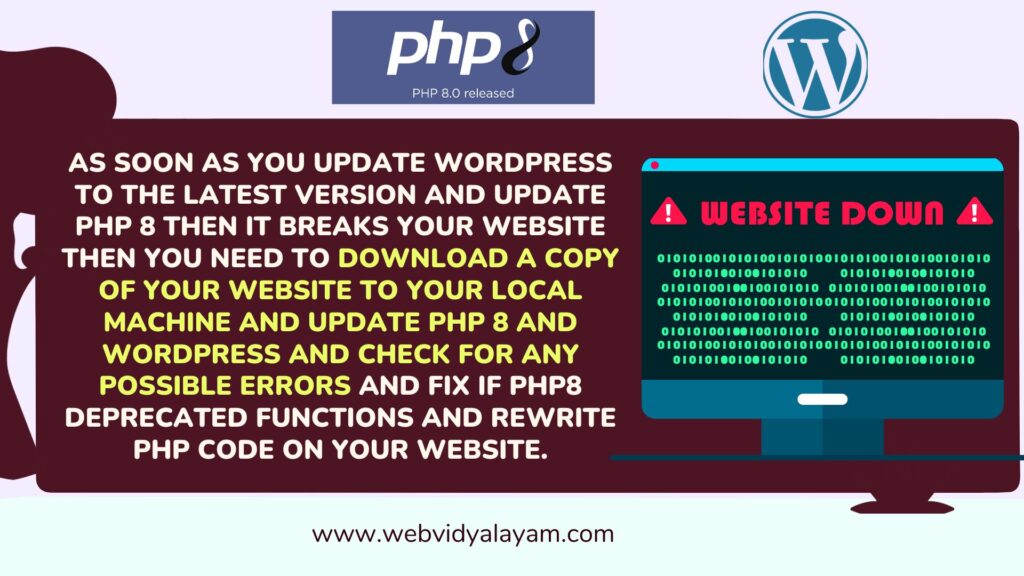
As soon as you update wordpress to the latest version and update php 8 then it breaks your website then you need to download a copy of your website to your local machine and update php 8 and wordpress and check for any possible errors and fix if php8 deprecated functions and rewrite php code on your website.

What is the Problem With PHP 8.0 with WordPress?

Php 8 on wordpress will not be compatible with plugins and themes on your wordpress website and as soon as you update your wordpress website will break and to avoid this issue you need to update php 8 in local system using xampp, wamp or if you have mac then lamp and then update php 8 and write php 8 compatible code.

The main issue is plugins and themes will not be written with php latest version compatibility or wordpress compatibility and plugin authors or theme authors need to update the code as per latest php 8 recommendations and write compatible code.

How to Fix WordPress not working with php 8 update

Follow below methods to fix wordpress not compatible or not working with php 8 version.

Code Compatibility

If wordpress websites break after updating php 8 then the php code written in plugins or theme files are not compatible with the newer version of php8 and you need to write code which is compatible with the new version of php 8 and update php 8.

Downgrade to previous PHP version

Due to incompatibility issues with php 8 ike plugins and themes will not work with latest version of php and to make your website live after updating wordpress, you need to downgrade php version to previous version like php 7.4 or earlier version and enable debug log and check what’s causing the issue and fix the code.

Disable Themes and Plugins on WordPress

Most of the time, after updating php 8 on WordPress website this the issue is with Plugins or themes on your wordPress website and you need to enable debug mode on wordpress which will display which plugin is causing error and once you identify the plugin then go ahead and disable plugin and your wordpress will be up and running.

Problem with Theme

If you have installed theme on wordpress and update php 8 then theme files also cause wordpress website not to work on php 8 update and you need to disable them and check if the issue is with theme or not and if theme is causing wordpress website to break after updating php 8 then you need to fix theme files and write compatible code with php 8 and then update php on wordpress.

Use Plugins and Theme Compatible with PHP 8

If you are planning to update php 8 on WordPress then you need to make sure that your php code is compatible with the new version of php 8 and update php and if plugins and themes have outdated code then it will break your WordPress website.

How to Highlight Text in WordPress Posts and Pages

0

If you are on WordPress and wondering how to highlight text with yellow color to display important pieces of text in your content then using WordPress highlight feature and by creating a custom style with mark tag and give custom css for mark tag and updating your style css and adding mark tag to the text that you want to highlight in your content will highlight text with color. So, let’s dive in deeper and check it.

Highlight Text in WordPress Posts and Pages

You can easily highlight text in WordPress posts and pages by two methods here.

Using Highlight Option and Edit Visually

Step 1: Login to your WordPress dashboard with your admin login details.

Step 2: Now, open the post that you want to highlight on your wordpress website.

Step 3: Select the piece of content or paragraph that you want to highlight and click on drop down on the above visual code editor.

Step 4: Click on the Highlight option and the color picker tool will open.

Step 5: Select text and choose the color to change text color and if you want to change background color then select background and select the color from color pallet.

Step 6: If you want to highlight text with custom hex code then select custom here in color pallet and then paste the hex code and it will change.

Step 7: Click on update and update wordpress post or page.

That’s it, this is how you highlight text in WordPress posts for a particular paragraph or piece of content in WordPress posts or pages using a visual editor.

Using Mark Tag

To highlight text color in WordPress post you can also use default html mark tag and assign a specific color that you want to highlight text in css file and update it and use mark tag in html.

Step 1: Login to your admin panel of WordPress and go to customizer

Step 2: Update css of mark tag – mark: {color:#FFFF00;} (yellow color) and save css or update mark tag css in style dot css file.

Step 3: Now, open the post that you want to highlight and highlight the text and click on 3 dots and click on edit as html.

Step 4: Wrap the text that you want to highlight in the mark tag here -> <mark>highlight text</mark>.

Step 5: Click on update and publish post and see the changes.

That’s it, this is how you highlight a piece of text with color – background or text color using mark tag.

Google Now Accepting Feedback on Search Quality Issues for Spammy, Low Quality Pages, Keyword Stuffing etc

Google released a new way to report search quality issues in Google search ranking and Google has a sophisticated algorithms and automatic spam detection to get rid of spam and rank websites who follow google guidelines as mentioned in Search essentials and websites violating these spam guidelines will rank lower or may not appear in search results at all. 

Spammers are everywhere and there is no way to stop them as soon as google detects the spam it throws website from organic search results and penalize them and they come back with new techniques and continuously spam google search by scrapping other reputed websites, with links, thin content, automatically generated content which is not helpful to user and many other techniques. Google algorithms sometimes miss websites as well as web is huge and evolving day by day with new techniques of spamming.

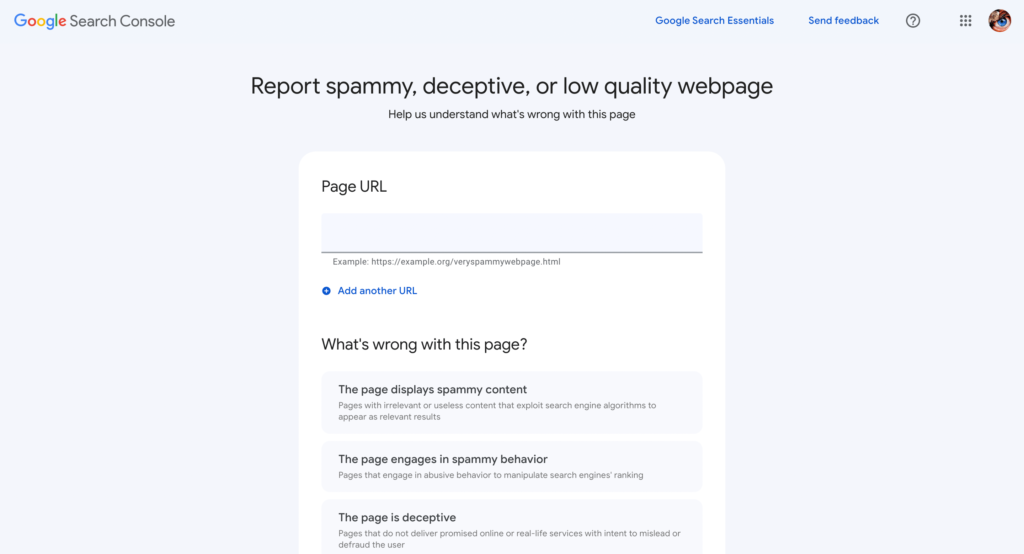
Now, Google Releases search quality issues feedback form and asking users to help find out any spam results appearing in Google search that may be missing to help improve google ranking algorithm and this new search quality issues is more than a form and you can report spam, malicious behavior, low quality, deceptive, paid links and other quality issues as well.

Report Search Quality Issues with Feedback Form

Google made it very simple and easy for users to report websites who are spamming but they are still able to rank in google search by manipulating search engine and google algorithms may miss few things as web is huge and its evolving day by day with new techniques and google making this Report Search Quality Issues with feedback form for users to know what users are thinking what google search is serving on top are high quality pages or not and want to know websites who are spamming but still ranking on first instead of high quality page not ranking on page or low quality page ranking instead of high quality web page etc.

What Can I Report with Search Quality Issues feedback form?

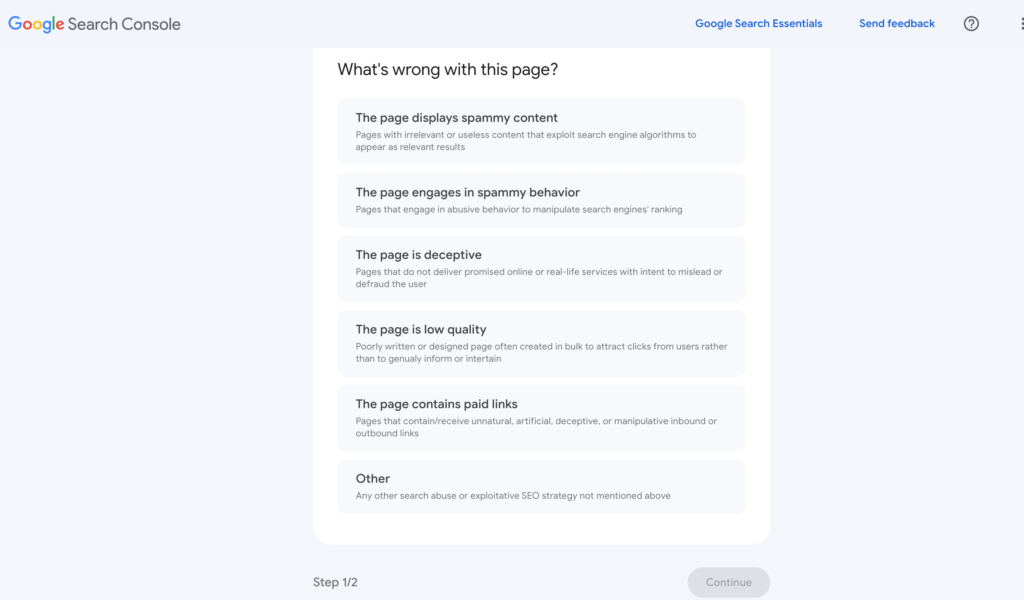
This new search quality issues feedback form includes more options and lets you report for the spammy webpage, quality and others as mentioned below.

  1. Report spam
  2. Paid links
  3. Malicious behavior
  4. Low quality
  5. Scrapped Content
  6. Keyword Stuffing
  7. Thin Affiliate Pages
  8. Hacked Pages
  9. User Generated Spam
  10.  Cloaking and Sneaky redirects
  11.  Hidden Text and Links
  12.  Doorway Pages
  13.  Scam or Fraud
  14.  Misleading Functionality
  15.  Page has low Quality
  16.  Page Contains inorganic links
  17.  And if you are not sure – select Other option and you can check more here for search quality user report here

Can I Submit Bulk URLs in Search Quality Issues Feedback Form?

You can add bulk urls at a time like 20 or 30 but you can add up to 5 urls at a time and select the correct reason for what’s wrong with the page.

Which Options to Choose when Reporting Search Quality Issues Feedback form?

Sometimes, it become a bit tricky to choose what’s wrong with the page and the page which you are reporting via Search Quality Issues Feedback form may be violating all options of the above, in this case you need to chose which is the most important here and resubmit the form multiple times by selecting options as well and if you have any doubts then you can select other option as well here in Search Quality Issues Feedback form and continue selecting other options and submit.

What Happens After Submitting Search Quality Issues Using Feedback form?

Once you submit reporting Search Quality Issues using feedback form you will receive an email confirmation along with the help articles links to external resources and google search console help forum for support and google takes user feedback very seriously.

How To Fix a 404 Errors in Google Search Console

Add a 301 redirect to the relevant page and make sure the url is not having any typo errors and update sitemap file with 200 ok status and wait for google bot to crawl and drop 404 page from google.

Generally, 404 pages are crawl errors, when google bot discovers urls from your website via sitemap file or with general crawling, and finds a page which is not existing on your website and the url returns a http status 404, then google bot will report 404 not found error in search console.

You need to Identify the source of the error by checking the URLs reported in the Console and If the page has been removed or url changed, then you need redirect the URL to a relevant page using a 301 redirect and update sitemap file and Submit a sitemap containing updated URLs to Search Console and Monitor the Search Console -> Page indexing – > not found (404). 

Things to Check if you Receive 404 Not Found Error in Search Console

Check the URL: Make sure the URL is correct and that it exists on your website and you are able to view the url in browser instead of getting a 404 page with 200 ok response code. 

Check for typos: Ensure there are no typos in the URL that you submitted to Google Search Console.

Make sure that the url is exactly the same url that is reported under search console 404, sometimes, URL capitalization, broken urls – missing hyphens, or end of the url is broken or not. 

If you see a url, broken or adding extra characters in the url then search console 404 error report then you need to add a 301 redirect to working url on your website with status code 200.

Redirect the URL: If the URL has changed, redirect the old URL to the new one using a 301 redirect.

Submit a sitemap: If the URL is not appearing in Google Search Console, submit a sitemap to inform Google of all the pages on your website.

Check robots.txt: Ensure that the URL is not blocked by your website’s robots.txt file.

Check for crawl errors: Check Google Search Console for any crawl errors that may be preventing Google from accessing the URL.

Fetch as Google: Use the “Fetch as Google” tool in Google Search Console to see how Google sees the URL and troubleshoot any issues.

for any changes and resolve any new 404 errors as they occur.

Fix 404 Error not Found in Search Console

Add 301 Redirect

If you get a 404 not found error, then add server side 301 redirect from 404 page to relevant pages and add if you don’t want to add 301 redirect then raise straight 404 error not found error.

If you are getting 404 errors from external source, like other external website has added your website url – with broken url then you don’t need to do anything and you can add a 301 redirect to the correct url and you can try to reach out the website owner who have linked your domain wrongly and ask the person or owner to update the url with correct url.

Since the error is from outside of your website, you don’t need to worry and google bot is able to detect and figure out that it is from an external source and does not affect your website ranking at all. If you want you can add 301 and fix 404 errors in the search console.

Raise 404 and Keep it as it is

In some scenarios, If you want to raise a 404 on a particular page and you want to tell google that we don’t have that page anymore on your website that google is crawling then it’s totally fine, let google know its a 404 (not found) page and google will drop the url from index – but you need to wait and it can take a little bit of time and 404 does not affect your ranking in google – it has nothing to do with ranking – as 404 are not part of google index – Google will drop the url from Google index – once google figures it out.

Generated Hacked URL 404 Error in Search Console

If your website is hacked with a japanese keyword hack and urls are generated on your website then you need to delete generated hacked urls and raise a straight 404 and let google know that those pages don’t exist anymore and drop it from google index.

In this case, with generated 404 urls from japanese keyword hack, you should not play around by adding a 301 or 302 redirect and you need to raise straight 404 and having a redirection from generated hacked url to another url on your website is bad idea and you should not do that. Let google discover its a 404 and drop it from google index.

Causes of 404 URls in Search Console

If the page that you have published on your website is unpublished or the page is deleted from your website or the url address of the page is changed to a new address then google will crawl the old url and it will throw a 404 error.

If the url is broken or hyphens or anything missing from the url or having URL capitalization or a mistyped url can raise 404 errors.

Update Sitemaps

Don’t update your sitemap with 404 urls and you need to update with 200 on status urls in the search console sitemap section and let google crawl it and discover your website urls.

Does 404 Pages Affect Rankings?

No! 404 pages does not affect ranking and it is crawling process not indexing or ranking process or serving results in google. Google reports 404 4xx level errors, 5xx level errors in the search console and it just reports what google bot encounters and it will not affect any ranking of your website in google search.

Google’s Search Generative Experience AI: New Look and Examples

Google Search Generative Experience AI

Google’s Search Generative Experience AI

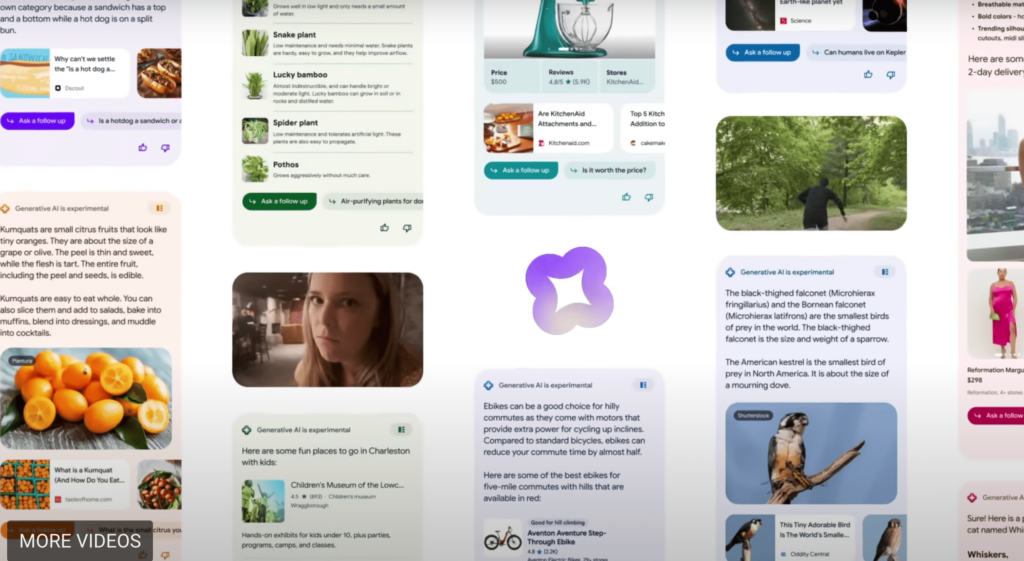
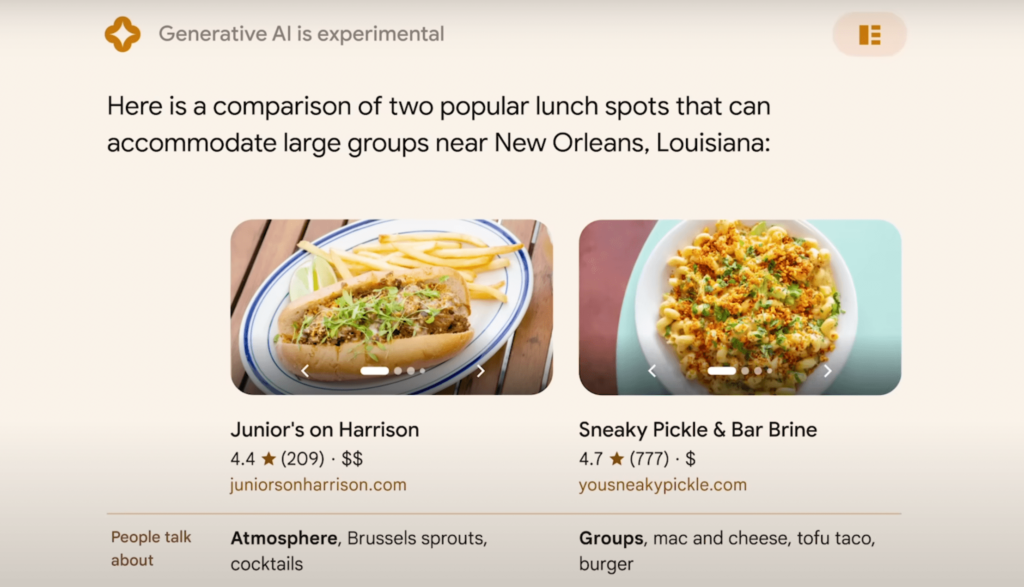
Google Search Generative Experience is a new way of experiencing search results when you search for a query in Google search which enhance Google Search and revolutionize how people engage with information and you get results in different layout and colors and different set of look for every query and you can also ask followup with Google Search Generative AI and Google Calls it as SGE (search Generative AI).  

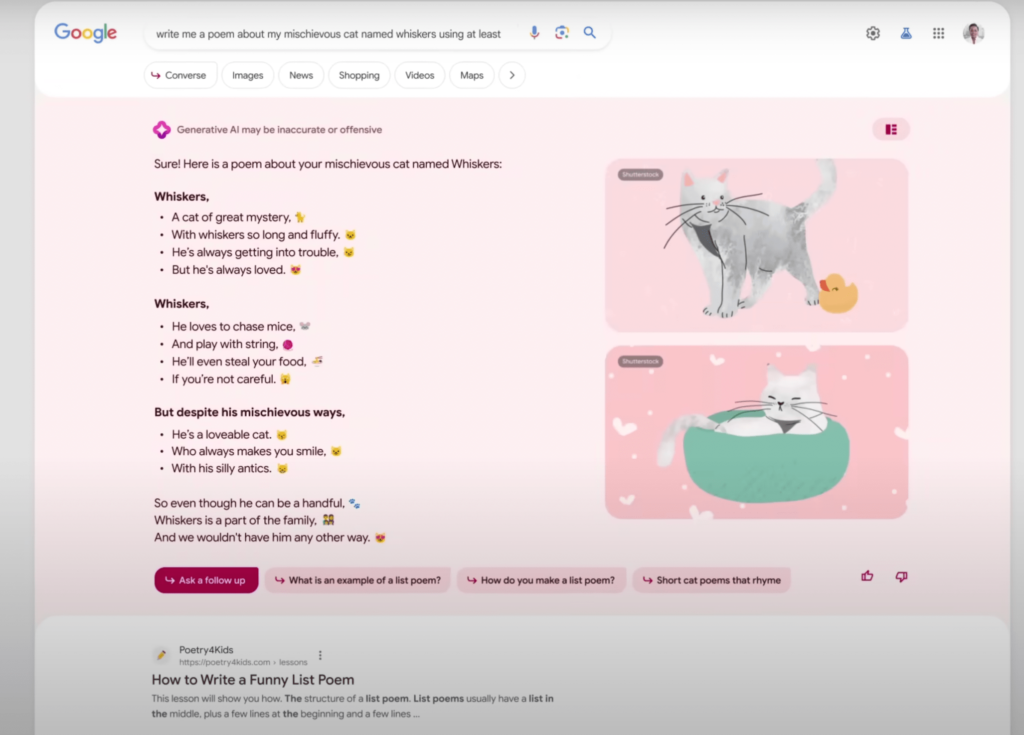
Google’s Search Generative Experience AI: New Look and Examples for when you ask for poems

You can do plenty of things with Search Generative Ai like you can do shopping,, ask for places to visit or any thing you want and get results in unique and supercharging search results with Google Search Generative AI and search for heavy lifting long queries with generative AI, Search can do easily and uncover new viewpoints and insights.

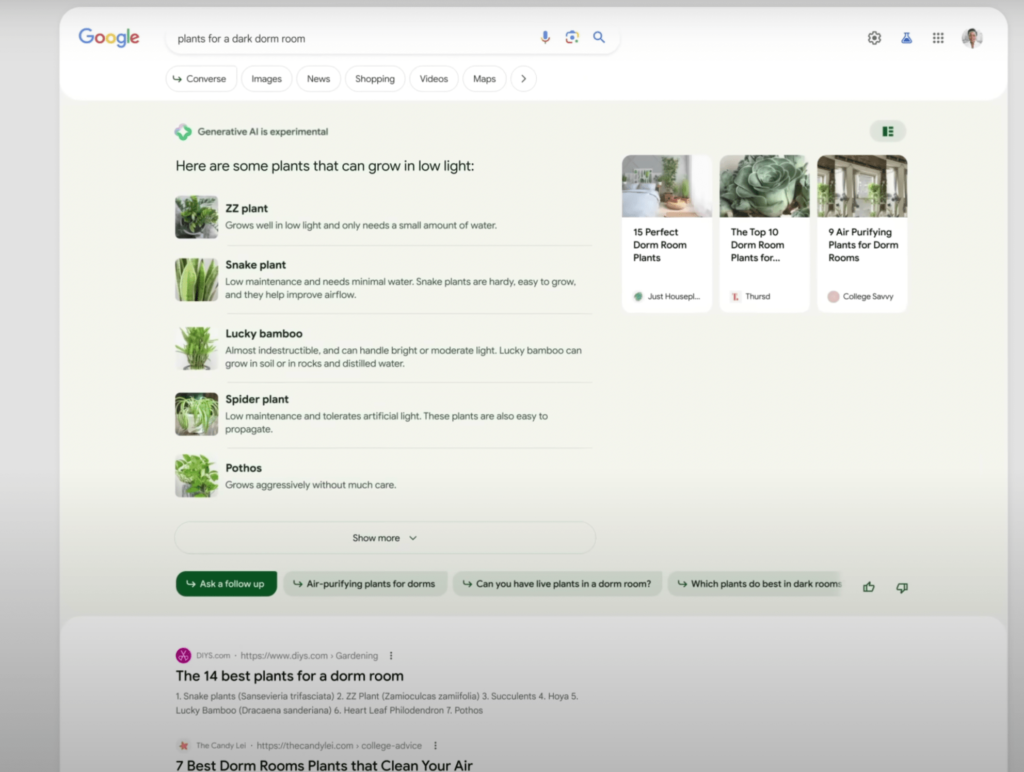
Google’s Search Generative Experience AI Examples

Google Brings Search Generative Experience AI

Google now brings a new UI and Google search results with the new Google Search Generative Experience AI which is announced on Google I/o 2023 and with New Google Search generative results that are rooted in to google search, which givers users a new way to Search with Generative AI and experience search results returning in a new organised way from a single search with different colors along with web results and ad as well with google search generative Experience AI.

Google Search is Evolving day by day and with the new Core Google Algorithm update which makes changes to its core system and generates results with high quality content and servers results to users and this time with the AI Competition from Chat GPT, Bing and Other search engines, Google has to take a step further as Google is Search Engine Giant and it can do more more even better than chat gpt and Bing and other AI models.

In 3 Ways New Google Search Generative AI Can Help

Google announced that they have opened search geneartive ai in search labs and opened early access in us and you can sign up for early access and test search generative ai and as of now, search generative ai can help you in 3 new ways. 

what you can do with sge - Search Generative AI
  1.  SGE (Search Generative Experience)
  2. Code Tips and
  3. Add to Sheets in the U.S

With New Generative AI powered Search experience will help you take some of the work out of searching.

What Users Can Do With Google Search Generative Experience AI

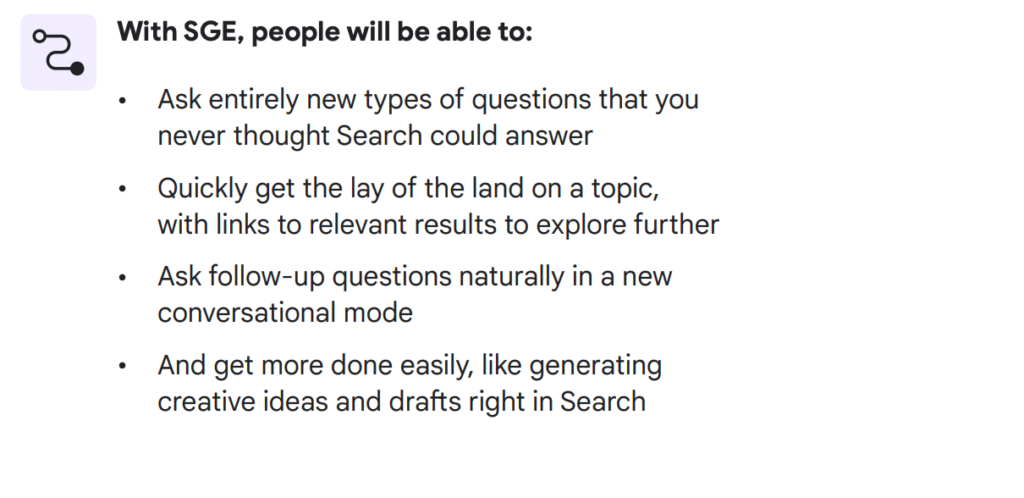
With new google search generative Experience Ai, users will be able to do entirely new things a few of them are listed below. 

1) Ask entirety new type of questions that you have never imagined to ask in Google Search

2) When you ask with Google Search generative Experience AI – you will be able to quickly able to lay off search results with links to relevant results to explore along with other search results.

3) You can also ask follow up for the question or query that you have just asked google and get results and have a conversational mode which helps users a lot.

4) You can also get done more easily by generating creative ideas like and drags in search and many more other results.

Does Search Generative Experience Makes any Difference to Google Search

Yes! It Does and Google is supercharging search results with AI and improving search results with AI and get results more easily and can returns results easily with new view points and new supercharged search results and it will understand topic faster and ask followup with conversation AI which is embedded into Google core search to give users a new rich look and better search results with Search Generative AI.

In 2019 Google came up with  Bidirectional Encoder Representations from Transformers (BERT) and Google introduced AI with Google Search which made lot of difference in google search it can be AI Language models, like MUM, BERT, RankBrain, Neural Machine and many others and it has pretty much shaken up everyone and google continuously updating their core algorithm as well to make search better.

Know More About Google 15th March 2023 Algorithm Update

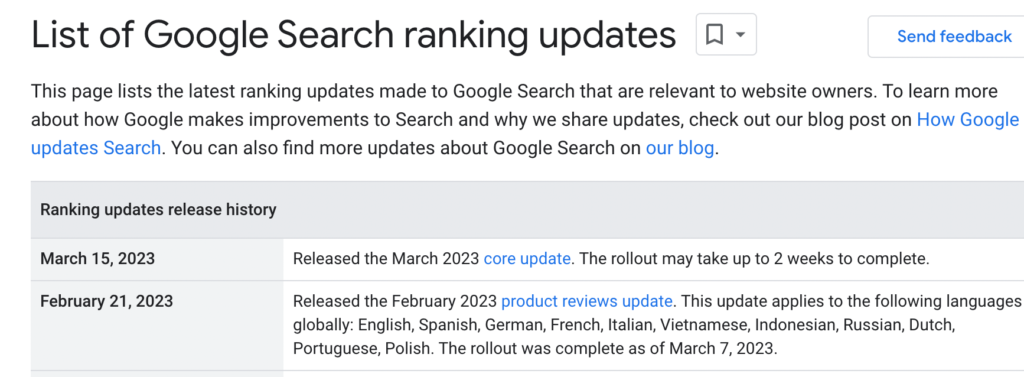
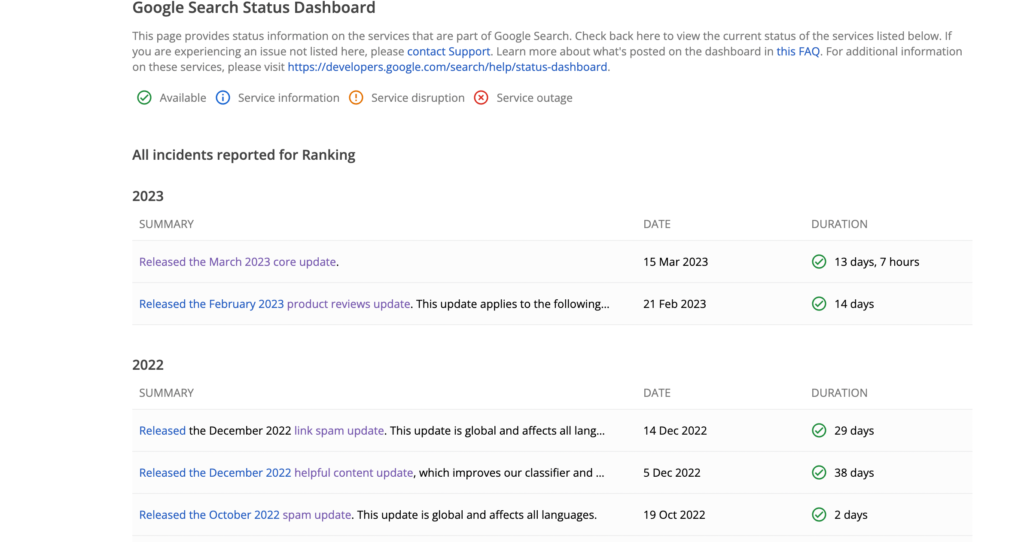
  • On March 15th 2023 Google Search Algorithm update started rolling out and it takes 2 weeks to completely roll out.
  • Google Algorithm update was completely rolled out on March 29th 2033 and Google March 15th 2023 Algorithm took 14 days 7 hours to completely roll out.
  • In 2023 February 15th Google rolled out Product Review update and it completely rolled out and update was finished on 8th of March 2024.

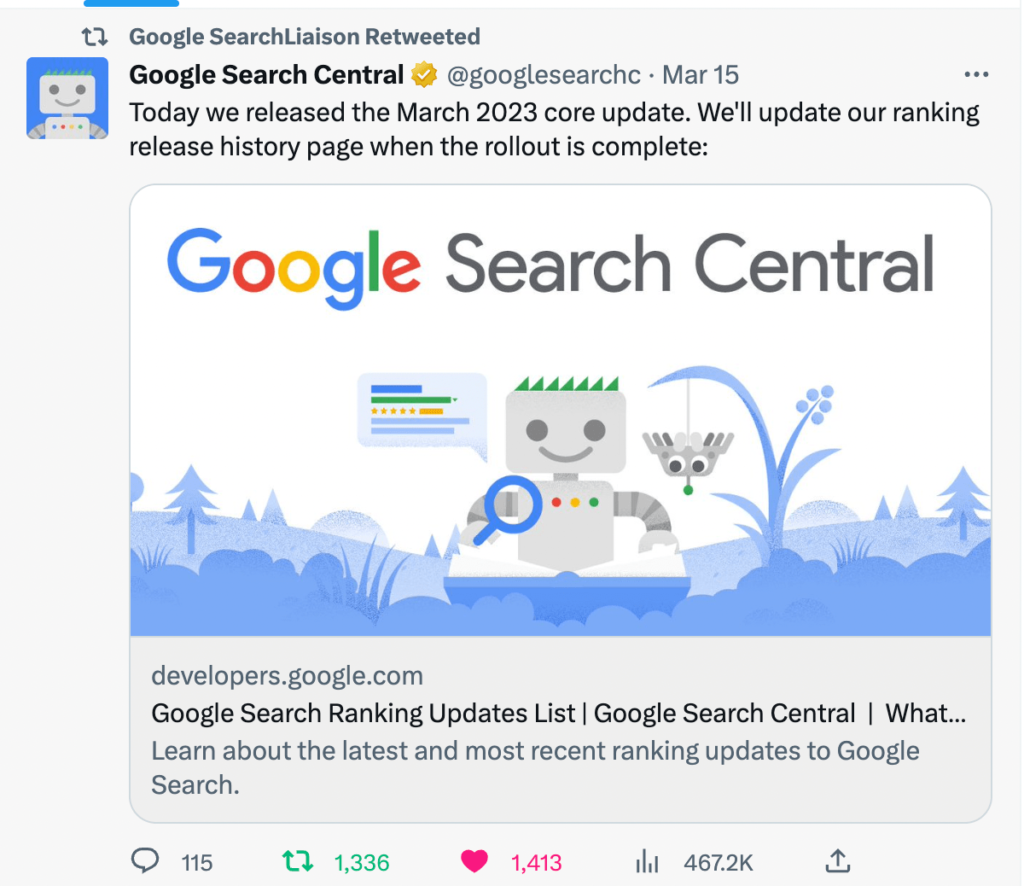
Google announced and shared March Google Algorithm update new and updated google search ranking update page,  they named this algorithm as March 2023 new Google core update started rolling on 15th march and it usually takes up to 2 weeks to completely rollout march 2023 google algorithm update and on March 29th Google March 15th Algorithm update rollout completed and it took 14 days 7 hours to completly roll out.

15th March 2023 Algorithm Update
image source – Google Searchliaison Twitter

This is Second Google Algorithm ranking update in 2023 and first google algorithm update was product review update which took alight 2 weeks to complete the rollout and there are many websites which have seen lots of ranking drops overnight and few website have seen ranking gains and ranking drops after couple of days as well.

When Was Google March 15th 2023 Algorithm Update Completed

Google March 15th 2023 algorithm update completed on march 29th 2023

On March 29th 2023 Google March 15th 2023 search algorithm update was completely rolled out and it took 14 days 7 hours to roll out Google Search Algorithm completely and google updated its search status dashbord.

Is Your Website Hit By Google March Ranking Algorithm Update?

If you are seeing ranking drops on your website after March 15th 2023, then you need to sit back and relax and wait until google completely rolls out and wait for the update to completely done. When Google rolls it search ranking algorithm updates, you may see a ranking drop on day 1 and after day 3 or day 4 or later days, you will see an increase with your website traffic as well. In ongoing process of Google search ranking update it is common and its too early to decide that your website is hit with March 2023 Search ranking algorithm update.

Ranking Keywords Suddenly Dropped from Page 1 to Page 10 etc?

This is pretty common the ranking keywords lost ranking when google search core update gets rolled out and if you are ranking for featured snippets then you may lost rank as well as the first page spot is not always mandatory for your website to appear always until and unless it meets google search guidelines and authority of website and author and EEAT and YMYL pages always see ranking shifts in ongoing process of google core march algorithm update or after google march ranking update gets completed.

Also Read:

1) Fix and Recover Google Rankings Dropped Overnight Guide

2) How to Fix Pages Not Indexed Status URL in Google Search Console

3) 10 Common Reasons Why Page Indexed in Google but not Ranking?

4) How to Fix Discovered currently not indexed in Search Console

5) How to Fix Crawled Currently Not Indexed Solutions

What to Do if your website is hit with the March 2023 Google Algorithm Update?

Sit Back and grab a coffee and Open search console and compare data from previous days and find the pattern and check which area of your website got affected and check if there is any similar pattern on the pages that are ranking for keywords appearing on first page got disappeared and try to find any technical errors on your website and go to google search essentials – check for spam policies and make sure your website is following all google guidelines.

When to Evaluate Website Traffic Drop Once Google Rolls its Search Ranking Algorithm update?

You need to wait until google completely rolls out the algorithm and then wait for the data to get updated in search console and start comparing data from previous days and then start diagnosing your website and find pattern of ranking drops and make changes if they are needed and always focus on users – instead of focusing on writing for bots and using keywords and all and audit your website and look for keyword drop from google search.

When Was Previous Google Ranking Algorithm in 2023

In 2023 this is the second Google Search ranking algorithm update and the previous algorithm update was rolled on February 2023 which is a product review update and roll out was completed on March 8th of 2023.

Winners and Losers of Google Search March 2023 Algorithm Update

Of Course there are always winners and losers when Google releases a broad core algorithm update and if your website has content which is helpful to users then your website will be rewarded with ranking gains if your website is following google search guidelines. 

If you are seeing website ranking drop overnight after google search march 2023 then you need to improve authority, technical errors and write content which is helpful to users and don’t write for bots.

Does Adding Reviewed By Schema Markup Help Rank Better in Google Search

0
  • Adding Reviewed by schema in structured data on a website is not a Ranking factor, you will get beneficial by adding just reviewed by text and say to google that we reviewed – Google doesn’t lookup reviewed by scheme.
  • Reviewed by Schema markup by schema org is not used by Google in any schema markup except product review snippets and It’s a Myth that you add reviewed by scheme gains a ranking factor.

No! Simply adding reviewed by schema does not help any way to rank in Google Search and adding structure data on your website doesn’t give you a ranking boost, its something made up thing and its a seo myth.

If you add structured data which is supported by google – check structured data search gallery for supported schema org used by google, then google will use it and show it in rich results in google search to gain visual experience – snippets.

You need to understand one thing that by adding structured data simply helps google to understand your website content and structured data is just like html markup for webpage like browser rendering html markup and When google bot visits your website, uses structure data for fetching your content present on the website by just search engines like google, bing, yahoo and other search engines crawls and understands your content, That’s it.

Can i expect Ranking Better After Adding Reviewed By Markup?

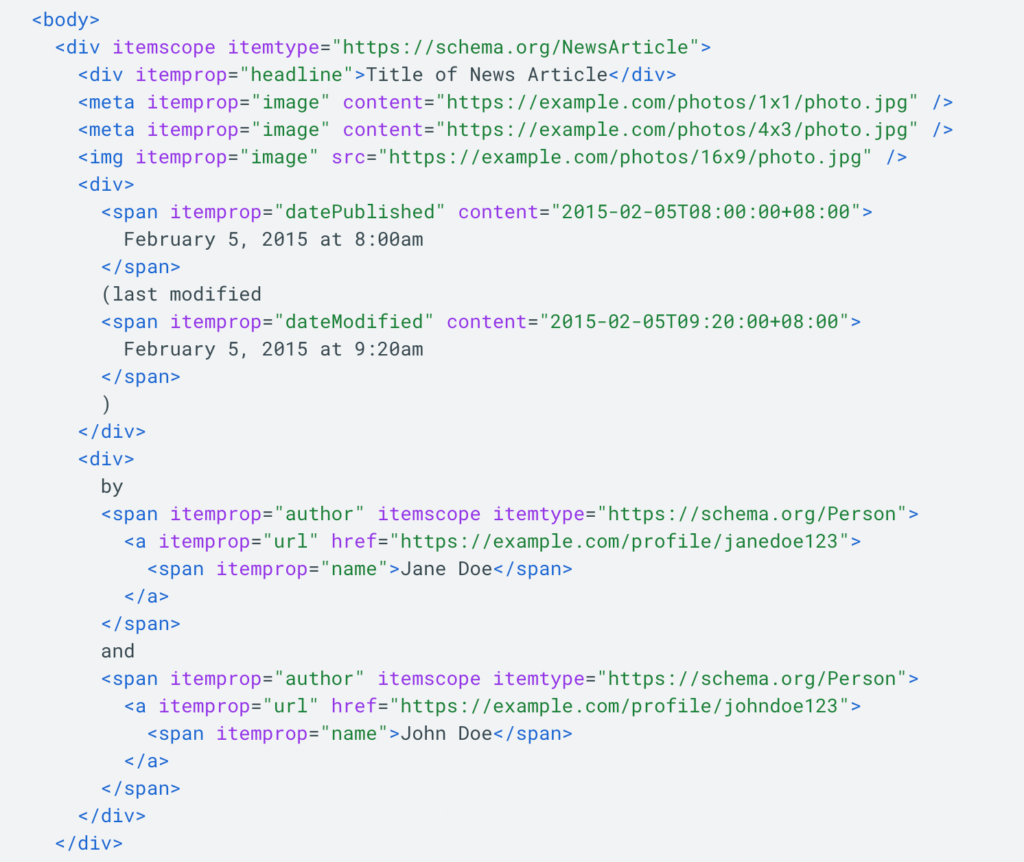
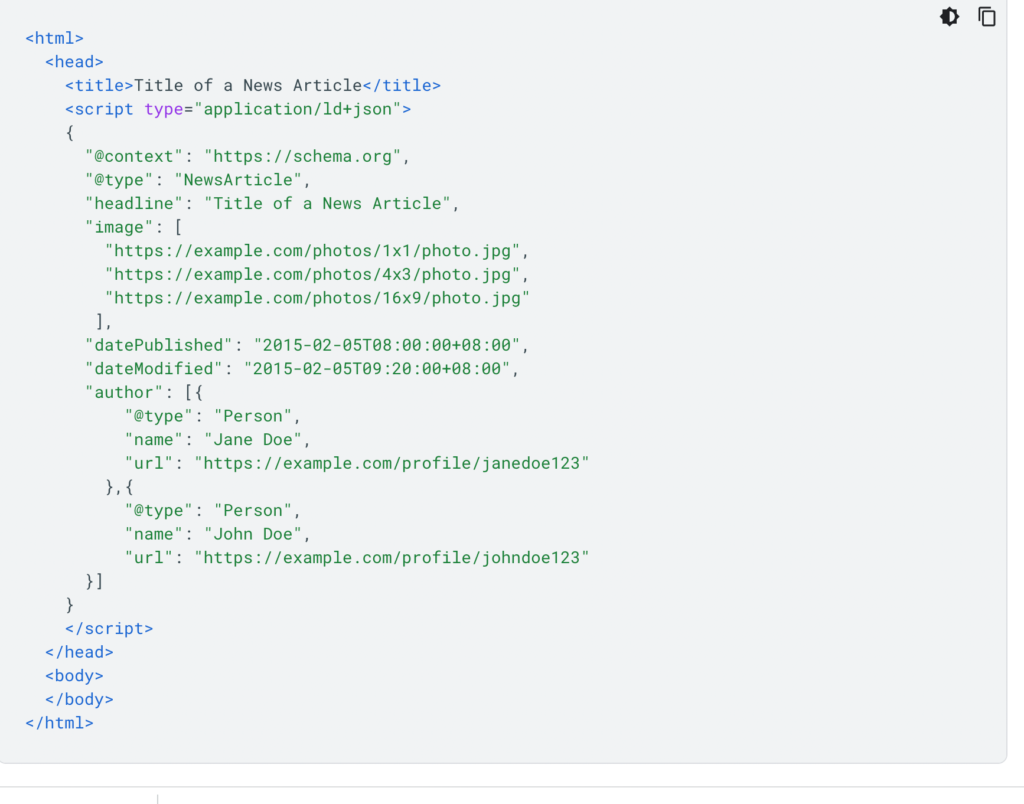
You should not expect to rank better after adding structured data reviewed by markup on your website and there is no reviewed by markup for article schema, WebPage Schema and there will be only published by, Modified By schema – it helps Google to understand your website and gain EEAT (Experience, Expertise, Authority, Trustworthiness). Reviewed by schema is no where used.

Nothing happens, Nor you will get a ranking boost, nor google will consider reviewed by schema markup in structured data to show in rich results (no option to show). 

Also Read:

1) XML Sitemap couldn’t fetch error in Google Search Console

2) How to Fix Page With Redirect Error in Search Console

3) How to Fix Pages Not Indexed Status URL in Google Search Console

4) How to Implement MedicalWebPages for Medical and Health Care Websites

5) Fix and Recover Google Rankings Dropped Overnight Guide

Is Structured Data a Ranking Boost?

No! Structured Data is not a Ranking factor nor does your website get a ranking boost after adding structured data.

Even though you are eligible and you have set up everything correctly in structured data then it will not show or you should not expect it to show rich results in Google.

Why Does Google Use Structured Data?

Structured data is used by Google to appear in Google Rich Results and there is no advantage of adding reviewed by Schema on the website and it becomes hacky structured data when you add schema markup which is not used by Google and google may consider it or sees your website content differently.

Google uses structure data to understand content better, when you add structured data then google will be able to show you in Rich Results Snippets in Google Search result and when you add reviewed by schema then there is no such kind of snippet used by google to detect Reviewed by Google to show in rich results.

Why Many Websites Are Adding Structured Data Reviewed By Schema Markup?

If other websites are using reviewed by on their website – then they are not depending on Google search rich results to appear, they are adding it to measure with different tools available only depending up on their business model and with different tools as google will not consider reviewed by scheme and Google will not support all schema org markup mentioned on schema org website only selective schema properties are used by Google to show them in rich results.

For product review websites, you can use product reviewed by and for content related websites like if you are adding it in news articles schema, or Article Schema then there is no advantage in doing that and its incorrect and google may see your website in a different way and rank it differently, nor they get beneficial with any ranking or get an increase in visibility in Google search results.

Are there no proven theories or Success Stories or by Adding Reviewed By Schema for web pages has increased their ranking or gained a ranking boost and that’s true and if you see other websites saying this – then don’t believe them and drop website url in comment section.

XML Sitemap couldn’t fetch error in Google Search Console

0
  • Wait for google bot to fetch xml sitemap and ping or update your sitemap.
  • Make sure your sitemap is valid and does not return any error and have a valid xml sitemap.

In Google search console if you have submitted sitemap and click on submit and you get an error message “xml sitemap couldn’t fetch error” then you don’t need to worry regarding this error and you can easily resolve this issue of xml sitemap couldn’t fetch error in Google Search Console and this means that google couldnt fetch your sitemap file at present. So, let’s dive in deeper and fix this issue with the sitemap file in search console.

How to Fix xml sitemap couldn’t fetch error in Google Search Console

In search console you can see errors with the sitemap file if the sitemap file is not valid or if any general http error with sitemap file or sitemap file is blocked for google.

Check Sitemap file is Valid and Open it in Browser

Step 1: Login to Search console and select your website property in search console.

Note: If your website is https then you should use httpS version property in search console.

Step 2: Now, click on sitemap section on left side menu

Step 3: On right site click on sitemap file that you have submitted in google search console

Step 4: Click on Open sitemap on top and open sitemap file in browser.

Step 5: If you are able to view sitemap file properly without any issue then you don’t need to worry and if sitemap url is throwing 404 or 5xx level error then you need to resolved this issue and make sure sitemap file is valid with 200 ok response and submit sitemap file in search console.

Now, go ahead and submit the sitemap in the search console again and wait for google to fetch the sitemap file and discover urls and crawl them for indexing.

Also Read:

1) How to Fix Pages Not Indexed Status URL in Google Search Console

2) Fix and Recover Google Rankings Dropped Overnight Guide

3) 10 Common Reasons Why Page Indexed in Google but not Ranking?

4) How to Fix Page With Redirect Error in Search Console

5) How to Fix Discovered currently not indexed in Search Console

Check Redirection Issues

When you setup your website, most of the time there will be an issue with domain versions not redirection to httpS final version url and you need to setup 301 redirect from all version of domain to final httpS version of your website, like www, http, httpS, non-www domain version to final httpS version.

Sometimes, http redirection to httpS gets failed and then you will get xml sitemap couldn’t fetch error in Google Search Console general http error and other errors like 5xx etc.

Check XML Sitemap is Accessible By Google

Sometimes, your hosting provider may block google sitemap files and this can happen and to check whether google is able to crawl a sitemap file, you need to go to the rich result test and drop the sitemap url in there and perform the test.

Perform Live URL Test with Sitemap URL

Step 1: Open Search Console and copy sitemap url of your website

Step 2: Click on top search url inspection tool and paste the sitemap url file and hit enter.

Step 3: Wait for google to fetch sitemap file and once done, you need to click on live url test and see the results.

Step 4: If you don’t see any error in live url test of your sitemap file, then you don’t have any issue with sitemap file and wait for google to crawl sitemap file.

Wait for Google to Crawl Sitemap File

If you see xml sitemap couldn’t fetch error in Google Search Console then don’t panic, this means that google hasn’t crawled your sitemap file yet and google doesn’t look for sitemap file every time you update it and google checks for the first time when google notices it. Only submit sitemap when its changed or updated and make sure you provide last modified date in sitemap file.

Why xml sitemap couldn’t fetch error in Google Search Console

If you have submitted your sitemap file recently then you can expect to see sitemap coulldnt fetch – meaning sitemap file is not yet processed or crawled by google and this does not show any affect on your website. It doesnt affect anything or change anything on yoru website. 

Google is just letting you that sitemap couldnt fetch – if google encounters an error when fetching sitemap file, then it will show you error like general http error or 5xxx error or any other error respectively with sitemap file in google search console.

Does sitemap file error xml sitemap couldn’t fetch error Cause Website Drop in Traffic

No! Sitemap file doesnt affect anything with regards to indexing or crawling or any kind of ranking drops and if your website ranking is dropped then you need to check with website ranking drop reasons and ranking updates by google – this will cause your website ranking drop from Google search.

Fix and Recover Google Rankings Dropped Overnight Guide

0
  • Check with latest Google Algorithm update released by google and changes they have made in Algorithm update and check for manual action in search console if you received any.
  • Analalize search traffic drop patterns and start optimizing pages and review expertise and authority of website and author and check with links (affiliate or shop links) and provide helpful content and delete irrelevant content.

If your website ranking dropped overnight from and you are seeing your website is not ranking for keywords that were used to rank on top and all of sudden this happened and your ranking still going down week by week or day by day then you have been hit by Google core algorithm update and to check with the dates or with which google algorithm you website got hit then check the list of core algorithm update log here.

First thing, you need to sit back and relax and grab a cup of coffee and start analyzing your website and you will need to access search console data and google analytics to identify the traffic drop and check with Manual Action section in Search console. So, let’s see in detail here and check google spam policy closely.

Fix Google Rankings Dropped Overnight

Google Rolls Algorithms for every 3 months or 6 months or sometimes continuous updates as well to improve search results in google, they also say that there is nothing wrong with your website and if other qualifying website are pushed up in search results then you will see change and sometimes these changes are noticeable and sometimes these changes are not noticeable as well.

If you are seeing sharp decline in Search Console performance report or in Google Analytics then you are hit by Google core algorithm update and mini algorithm as well (not confirmed – just an seo talk)

Google does provide information regarding the core update and what change they are making as well, like if they are rolling spam updates they will provide a guide for websites to recover as well.

If it’s a helpful content update then they will suggest website owners to provide helpful content and delete unwanted content or improve website content.

If it’s with page speed they will suggest website owners to load the website faster and fix website loading issues etc.

Identify Website Traffic Drop Pattern

You need to login to the search console and check by comparing site performance to previous days and look closely and identify the search traffic drop and once you identify search traffic drop then try to make changes and make improvements to the pages providing more rich information and optimize the page.

The best way to start is by reading from basics here at seo starter guide closely.

If you are seeing website ranking drop for pages which containing too many affiliate links articles which you are having on your website like amazon links (buy now) etc then you need to provide rel tags and tell google that these links and tell google via rel tag and tell more regarding links on your website.

If you are having same item, description with no added value from other website then this falls in thin affiliate pages and you need to provide a unique description and title.

Author Authority Matters

Google does check with the author and the amount of author expertise and google will check with author experience and bio as well and avoid keeping article written by admin etc, provide original author information and Bio.

Copied Content

If you have taken content from another website and changed one or two paragraphs using synonyms and all techniques, then google may rank your page at some point but with google core update – Google will slash hard.

Feed Ads or Too Many Ads on Page

If your website page is outranking with ads like displaying too many ads which can outrank your website and this may lead to users for accidental clicks and redirect websites to ads clicking page and this will affect website quality as well.

Expertise of Author 

If you are providing information regarding medical topics or YMYL (Your Money Your Life) pages then google needs to know that the article is written by an expert or the content is just drawn from other sources and rewritten and do provide detail author expertise in his or her niche with a substantial amount of author expertise bio information with a degree in expertise.

Slow Loading pages

Loading speed and core web vitals are ranking factors and this is one of the ranking factors from many google algorithms and you need to make your website load faster with less ads with helpful information on the page.

Wait for Next Update

If you are good with all Google Search Spam Policies (Guidelines)  and there is nothing there for you to fix and no technical issues and all then you need to wait for google next update and this is not guaranteed there may be a reversal for released core update sometimes which few website owners say in SEO community and check with what happens with core update guide.

Follow these above mentioned sections and optimize your website and recovery guide will help you get your website back on track.

How do you Analyse website traffic drops?

Login to the search console and click on performance and start comparing search console performance from previous periods and analyze search traffic by looking closely with the ranking drop pages and see any similarity in traffic drop pages.

Why Has My Website Dropped in Rankings

You got hit with one of the core updates released by Google and this is pretty common and ranking fluctuation happens with every core update release and if you are not violating any guidelines of google then you don’t need to worry.

What to Do if Website Got Hit with Google Core Update

Review spam polices and core update guide and check every corner of your website, specially with authority of author and website and links on your website and make sure you are providing helpful content on your website and don’t write for search engines and write for users.

FAQ

Google ranking dropped dramatically

If you got hit with Google Core Algorithm update then traffic will decrease overnight dramatically and you need to follow recovery guide and follow google spam policies.

Why Do Our Search Rankings Drop on Weekends?

This is just users not searching for the keywords in Google on weekends, perhaps they are in a party mood at weekends.