Thursday, March 5, 2026
Home Blog Page 3

How To Fix a 404 Errors in Google Search Console

Add a 301 redirect to the relevant page and make sure the url is not having any typo errors and update sitemap file with 200 ok status and wait for google bot to crawl and drop 404 page from google.

Generally, 404 pages are crawl errors, when google bot discovers urls from your website via sitemap file or with general crawling, and finds a page which is not existing on your website and the url returns a http status 404, then google bot will report 404 not found error in search console.

You need to Identify the source of the error by checking the URLs reported in the Console and If the page has been removed or url changed, then you need redirect the URL to a relevant page using a 301 redirect and update sitemap file and Submit a sitemap containing updated URLs to Search Console and Monitor the Search Console -> Page indexing – > not found (404). 

Things to Check if you Receive 404 Not Found Error in Search Console

Check the URL: Make sure the URL is correct and that it exists on your website and you are able to view the url in browser instead of getting a 404 page with 200 ok response code. 

Check for typos: Ensure there are no typos in the URL that you submitted to Google Search Console.

Make sure that the url is exactly the same url that is reported under search console 404, sometimes, URL capitalization, broken urls – missing hyphens, or end of the url is broken or not. 

If you see a url, broken or adding extra characters in the url then search console 404 error report then you need to add a 301 redirect to working url on your website with status code 200.

Redirect the URL: If the URL has changed, redirect the old URL to the new one using a 301 redirect.

Submit a sitemap: If the URL is not appearing in Google Search Console, submit a sitemap to inform Google of all the pages on your website.

Check robots.txt: Ensure that the URL is not blocked by your website’s robots.txt file.

Check for crawl errors: Check Google Search Console for any crawl errors that may be preventing Google from accessing the URL.

Fetch as Google: Use the “Fetch as Google” tool in Google Search Console to see how Google sees the URL and troubleshoot any issues.

for any changes and resolve any new 404 errors as they occur.

Fix 404 Error not Found in Search Console

Add 301 Redirect

If you get a 404 not found error, then add server side 301 redirect from 404 page to relevant pages and add if you don’t want to add 301 redirect then raise straight 404 error not found error.

If you are getting 404 errors from external source, like other external website has added your website url – with broken url then you don’t need to do anything and you can add a 301 redirect to the correct url and you can try to reach out the website owner who have linked your domain wrongly and ask the person or owner to update the url with correct url.

Since the error is from outside of your website, you don’t need to worry and google bot is able to detect and figure out that it is from an external source and does not affect your website ranking at all. If you want you can add 301 and fix 404 errors in the search console.

Raise 404 and Keep it as it is

In some scenarios, If you want to raise a 404 on a particular page and you want to tell google that we don’t have that page anymore on your website that google is crawling then it’s totally fine, let google know its a 404 (not found) page and google will drop the url from index – but you need to wait and it can take a little bit of time and 404 does not affect your ranking in google – it has nothing to do with ranking – as 404 are not part of google index – Google will drop the url from Google index – once google figures it out.

Generated Hacked URL 404 Error in Search Console

If your website is hacked with a japanese keyword hack and urls are generated on your website then you need to delete generated hacked urls and raise a straight 404 and let google know that those pages don’t exist anymore and drop it from google index.

In this case, with generated 404 urls from japanese keyword hack, you should not play around by adding a 301 or 302 redirect and you need to raise straight 404 and having a redirection from generated hacked url to another url on your website is bad idea and you should not do that. Let google discover its a 404 and drop it from google index.

Causes of 404 URls in Search Console

If the page that you have published on your website is unpublished or the page is deleted from your website or the url address of the page is changed to a new address then google will crawl the old url and it will throw a 404 error.

If the url is broken or hyphens or anything missing from the url or having URL capitalization or a mistyped url can raise 404 errors.

Update Sitemaps

Don’t update your sitemap with 404 urls and you need to update with 200 on status urls in the search console sitemap section and let google crawl it and discover your website urls.

Does 404 Pages Affect Rankings?

No! 404 pages does not affect ranking and it is crawling process not indexing or ranking process or serving results in google. Google reports 404 4xx level errors, 5xx level errors in the search console and it just reports what google bot encounters and it will not affect any ranking of your website in google search.

Google’s Search Generative Experience AI: New Look and Examples

Google Search Generative Experience AI

Google’s Search Generative Experience AI

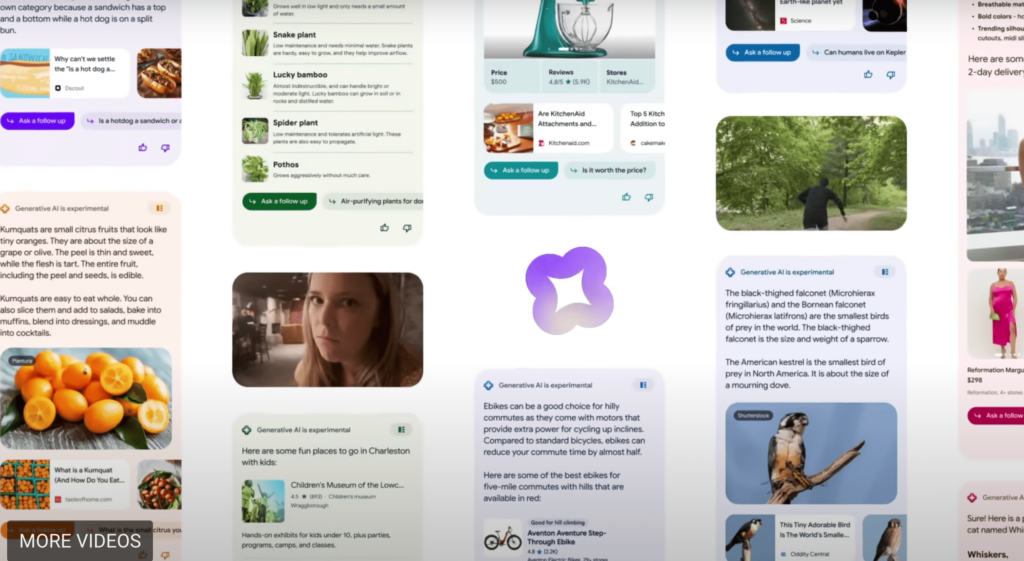
Google Search Generative Experience is a new way of experiencing search results when you search for a query in Google search which enhance Google Search and revolutionize how people engage with information and you get results in different layout and colors and different set of look for every query and you can also ask followup with Google Search Generative AI and Google Calls it as SGE (search Generative AI).  

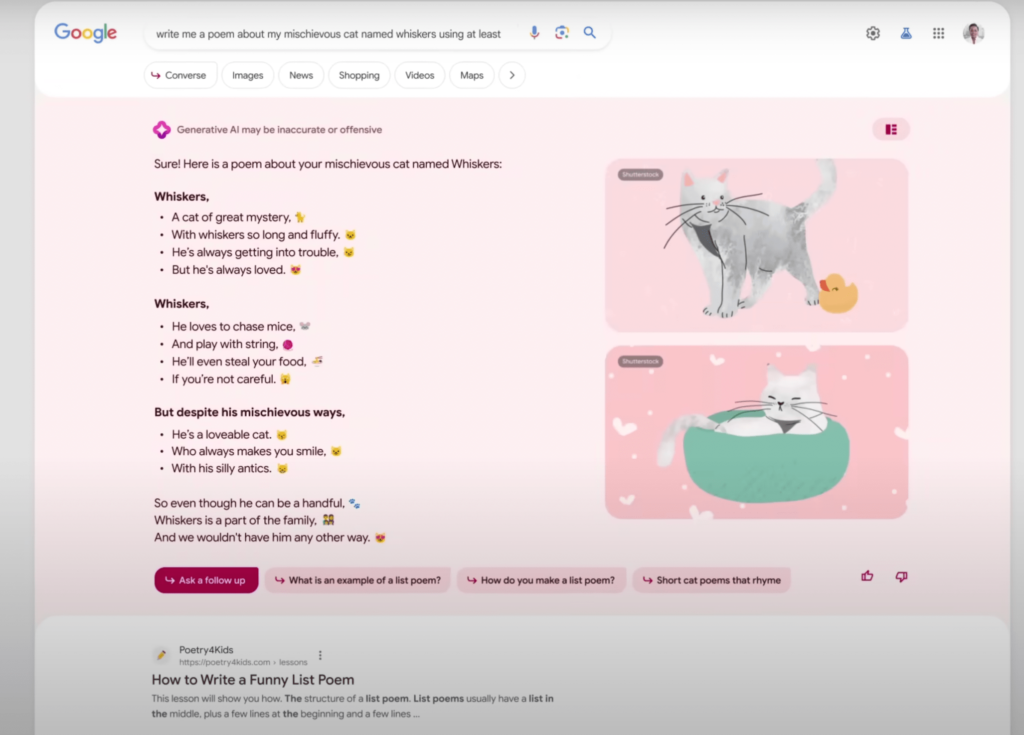
Google’s Search Generative Experience AI: New Look and Examples for when you ask for poems

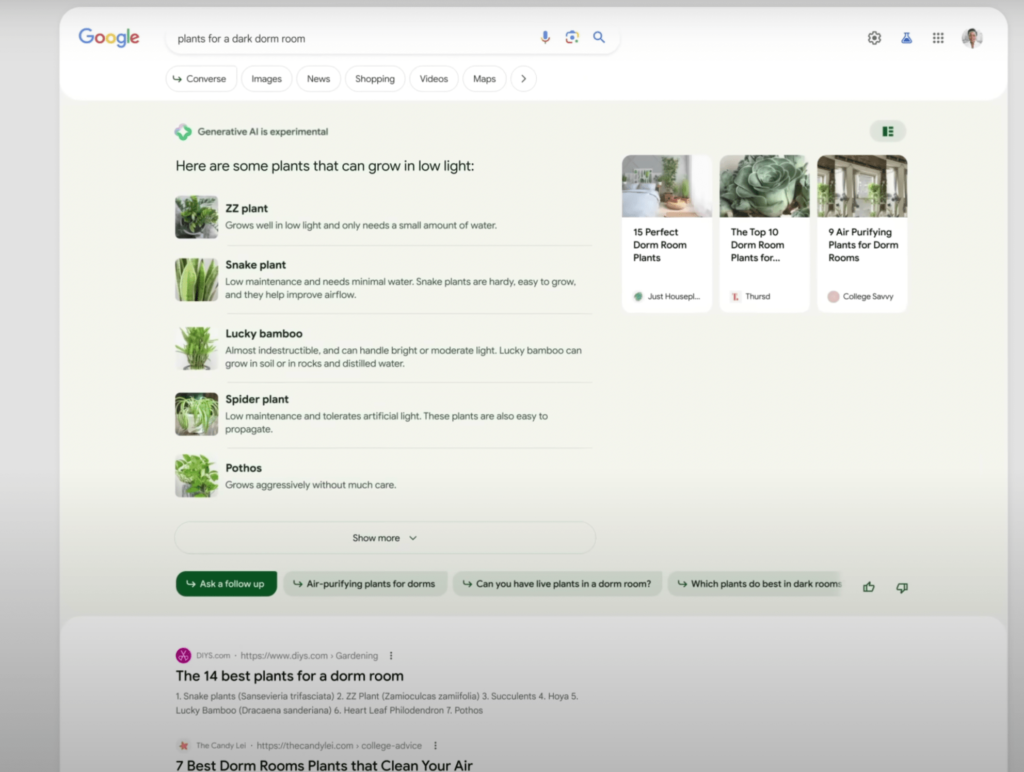
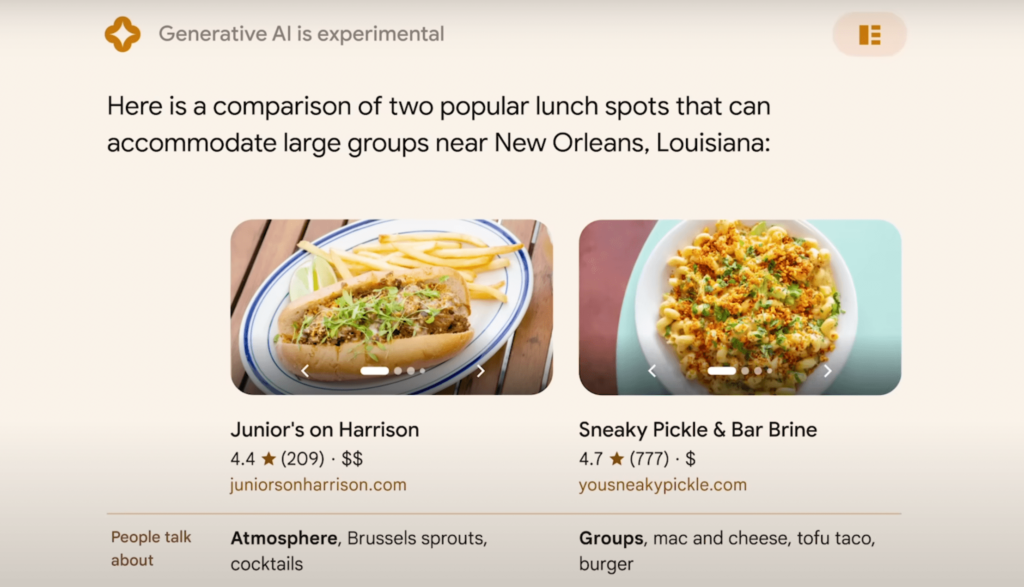
You can do plenty of things with Search Generative Ai like you can do shopping,, ask for places to visit or any thing you want and get results in unique and supercharging search results with Google Search Generative AI and search for heavy lifting long queries with generative AI, Search can do easily and uncover new viewpoints and insights.

Google’s Search Generative Experience AI Examples

Google Brings Search Generative Experience AI

Google now brings a new UI and Google search results with the new Google Search Generative Experience AI which is announced on Google I/o 2023 and with New Google Search generative results that are rooted in to google search, which givers users a new way to Search with Generative AI and experience search results returning in a new organised way from a single search with different colors along with web results and ad as well with google search generative Experience AI.

Google Search is Evolving day by day and with the new Core Google Algorithm update which makes changes to its core system and generates results with high quality content and servers results to users and this time with the AI Competition from Chat GPT, Bing and Other search engines, Google has to take a step further as Google is Search Engine Giant and it can do more more even better than chat gpt and Bing and other AI models.

In 3 Ways New Google Search Generative AI Can Help

Google announced that they have opened search geneartive ai in search labs and opened early access in us and you can sign up for early access and test search generative ai and as of now, search generative ai can help you in 3 new ways. 

what you can do with sge - Search Generative AI
  1.  SGE (Search Generative Experience)
  2. Code Tips and
  3. Add to Sheets in the U.S

With New Generative AI powered Search experience will help you take some of the work out of searching.

What Users Can Do With Google Search Generative Experience AI

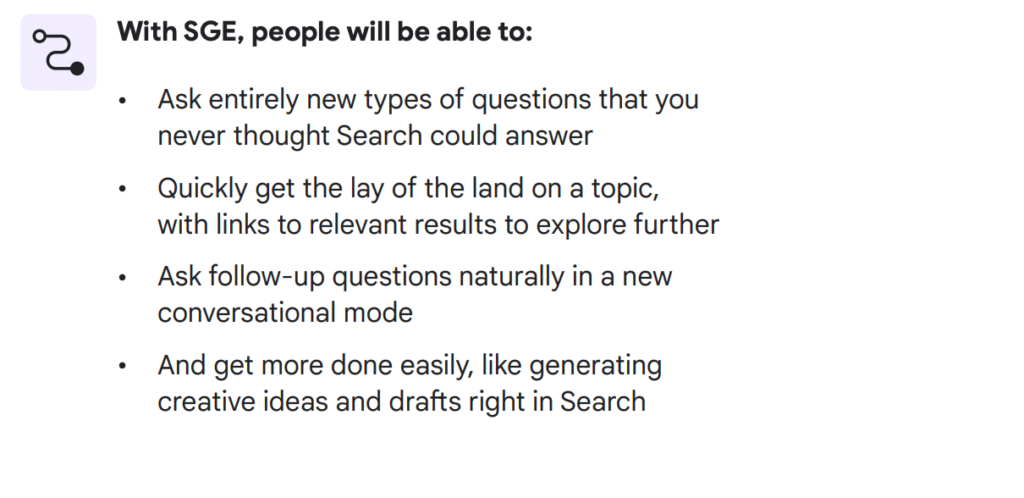
With new google search generative Experience Ai, users will be able to do entirely new things a few of them are listed below. 

1) Ask entirety new type of questions that you have never imagined to ask in Google Search

2) When you ask with Google Search generative Experience AI – you will be able to quickly able to lay off search results with links to relevant results to explore along with other search results.

3) You can also ask follow up for the question or query that you have just asked google and get results and have a conversational mode which helps users a lot.

4) You can also get done more easily by generating creative ideas like and drags in search and many more other results.

Does Search Generative Experience Makes any Difference to Google Search

Yes! It Does and Google is supercharging search results with AI and improving search results with AI and get results more easily and can returns results easily with new view points and new supercharged search results and it will understand topic faster and ask followup with conversation AI which is embedded into Google core search to give users a new rich look and better search results with Search Generative AI.

In 2019 Google came up with  Bidirectional Encoder Representations from Transformers (BERT) and Google introduced AI with Google Search which made lot of difference in google search it can be AI Language models, like MUM, BERT, RankBrain, Neural Machine and many others and it has pretty much shaken up everyone and google continuously updating their core algorithm as well to make search better.

Know More About Google 15th March 2023 Algorithm Update

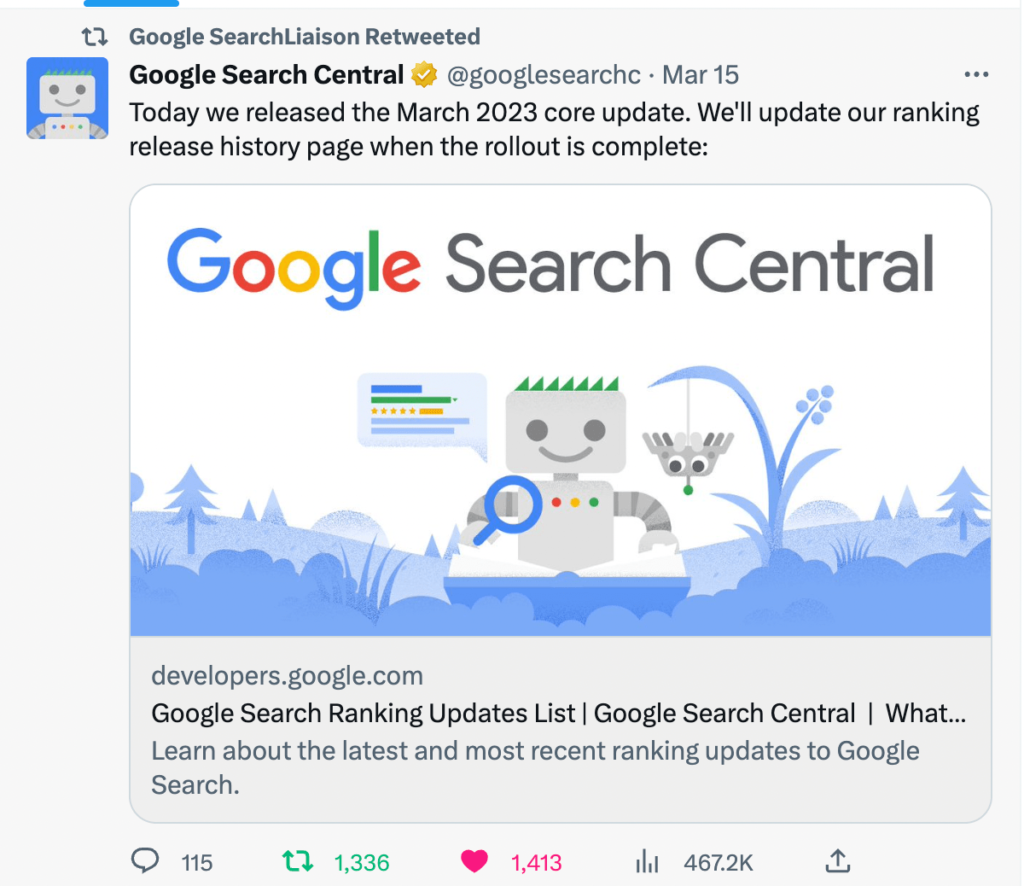
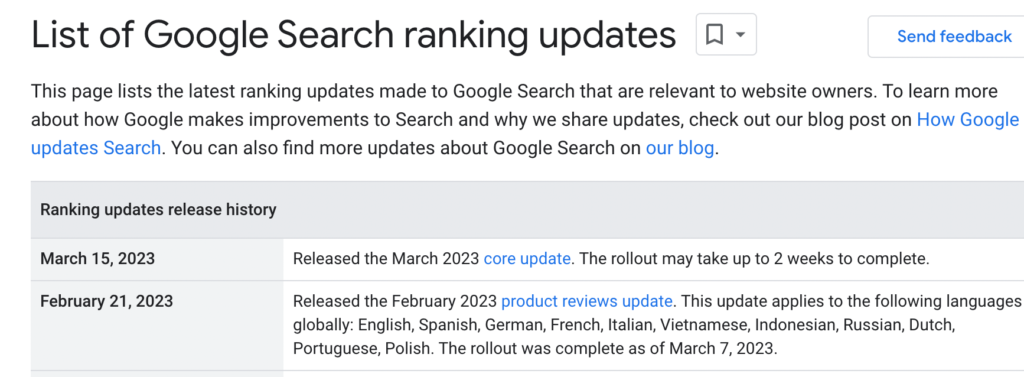
  • On March 15th 2023 Google Search Algorithm update started rolling out and it takes 2 weeks to completely roll out.
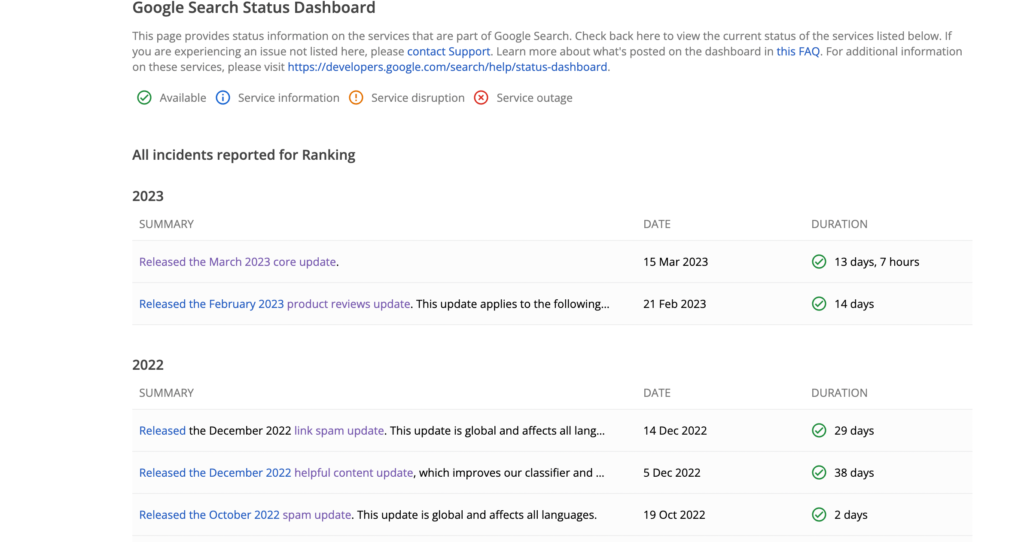
  • Google Algorithm update was completely rolled out on March 29th 2033 and Google March 15th 2023 Algorithm took 14 days 7 hours to completely roll out.
  • In 2023 February 15th Google rolled out Product Review update and it completely rolled out and update was finished on 8th of March 2024.

Google announced and shared March Google Algorithm update new and updated google search ranking update page,  they named this algorithm as March 2023 new Google core update started rolling on 15th march and it usually takes up to 2 weeks to completely rollout march 2023 google algorithm update and on March 29th Google March 15th Algorithm update rollout completed and it took 14 days 7 hours to completly roll out.

15th March 2023 Algorithm Update
image source – Google Searchliaison Twitter

This is Second Google Algorithm ranking update in 2023 and first google algorithm update was product review update which took alight 2 weeks to complete the rollout and there are many websites which have seen lots of ranking drops overnight and few website have seen ranking gains and ranking drops after couple of days as well.

When Was Google March 15th 2023 Algorithm Update Completed

Google March 15th 2023 algorithm update completed on march 29th 2023

On March 29th 2023 Google March 15th 2023 search algorithm update was completely rolled out and it took 14 days 7 hours to roll out Google Search Algorithm completely and google updated its search status dashbord.

Is Your Website Hit By Google March Ranking Algorithm Update?

If you are seeing ranking drops on your website after March 15th 2023, then you need to sit back and relax and wait until google completely rolls out and wait for the update to completely done. When Google rolls it search ranking algorithm updates, you may see a ranking drop on day 1 and after day 3 or day 4 or later days, you will see an increase with your website traffic as well. In ongoing process of Google search ranking update it is common and its too early to decide that your website is hit with March 2023 Search ranking algorithm update.

Ranking Keywords Suddenly Dropped from Page 1 to Page 10 etc?

This is pretty common the ranking keywords lost ranking when google search core update gets rolled out and if you are ranking for featured snippets then you may lost rank as well as the first page spot is not always mandatory for your website to appear always until and unless it meets google search guidelines and authority of website and author and EEAT and YMYL pages always see ranking shifts in ongoing process of google core march algorithm update or after google march ranking update gets completed.

Also Read:

1) Fix and Recover Google Rankings Dropped Overnight Guide

2) How to Fix Pages Not Indexed Status URL in Google Search Console

3) 10 Common Reasons Why Page Indexed in Google but not Ranking?

4) How to Fix Discovered currently not indexed in Search Console

5) How to Fix Crawled Currently Not Indexed Solutions

What to Do if your website is hit with the March 2023 Google Algorithm Update?

Sit Back and grab a coffee and Open search console and compare data from previous days and find the pattern and check which area of your website got affected and check if there is any similar pattern on the pages that are ranking for keywords appearing on first page got disappeared and try to find any technical errors on your website and go to google search essentials – check for spam policies and make sure your website is following all google guidelines.

When to Evaluate Website Traffic Drop Once Google Rolls its Search Ranking Algorithm update?

You need to wait until google completely rolls out the algorithm and then wait for the data to get updated in search console and start comparing data from previous days and then start diagnosing your website and find pattern of ranking drops and make changes if they are needed and always focus on users – instead of focusing on writing for bots and using keywords and all and audit your website and look for keyword drop from google search.

When Was Previous Google Ranking Algorithm in 2023

In 2023 this is the second Google Search ranking algorithm update and the previous algorithm update was rolled on February 2023 which is a product review update and roll out was completed on March 8th of 2023.

Winners and Losers of Google Search March 2023 Algorithm Update

Of Course there are always winners and losers when Google releases a broad core algorithm update and if your website has content which is helpful to users then your website will be rewarded with ranking gains if your website is following google search guidelines. 

If you are seeing website ranking drop overnight after google search march 2023 then you need to improve authority, technical errors and write content which is helpful to users and don’t write for bots.

Does Adding Reviewed By Schema Markup Help Rank Better in Google Search

0
  • Adding Reviewed by schema in structured data on a website is not a Ranking factor, you will get beneficial by adding just reviewed by text and say to google that we reviewed – Google doesn’t lookup reviewed by scheme.
  • Reviewed by Schema markup by schema org is not used by Google in any schema markup except product review snippets and It’s a Myth that you add reviewed by scheme gains a ranking factor.

No! Simply adding reviewed by schema does not help any way to rank in Google Search and adding structure data on your website doesn’t give you a ranking boost, its something made up thing and its a seo myth.

If you add structured data which is supported by google – check structured data search gallery for supported schema org used by google, then google will use it and show it in rich results in google search to gain visual experience – snippets.

You need to understand one thing that by adding structured data simply helps google to understand your website content and structured data is just like html markup for webpage like browser rendering html markup and When google bot visits your website, uses structure data for fetching your content present on the website by just search engines like google, bing, yahoo and other search engines crawls and understands your content, That’s it.

Can i expect Ranking Better After Adding Reviewed By Markup?

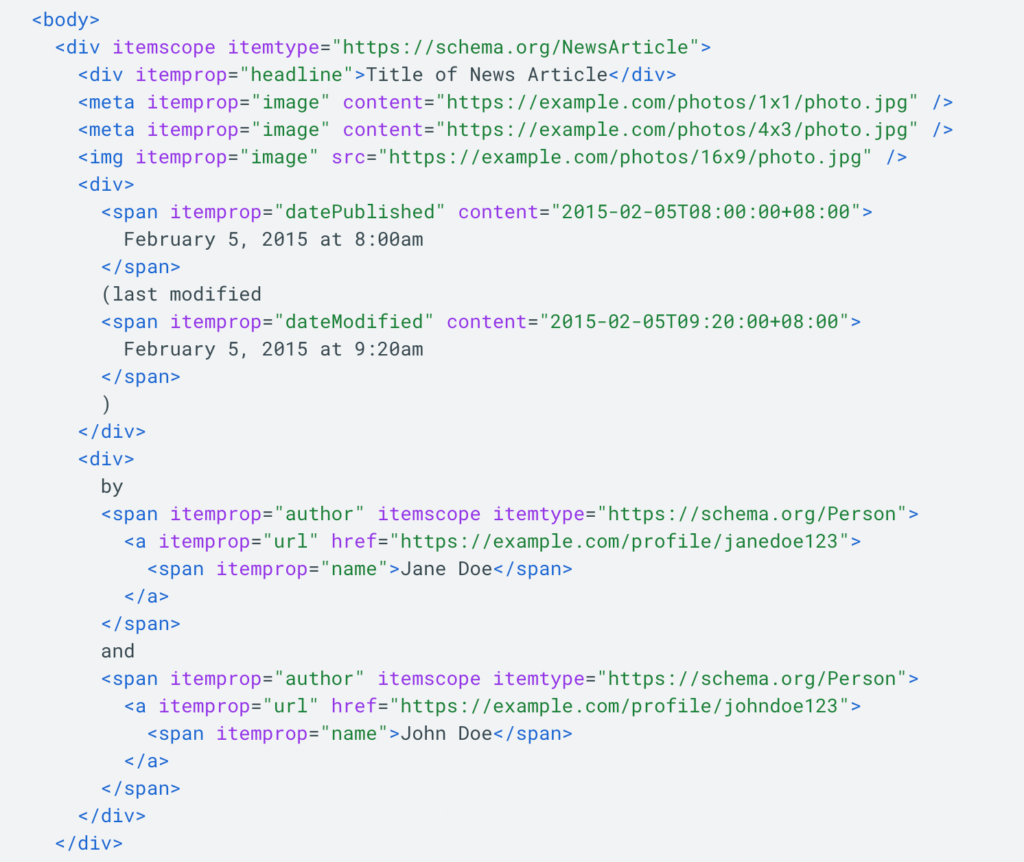
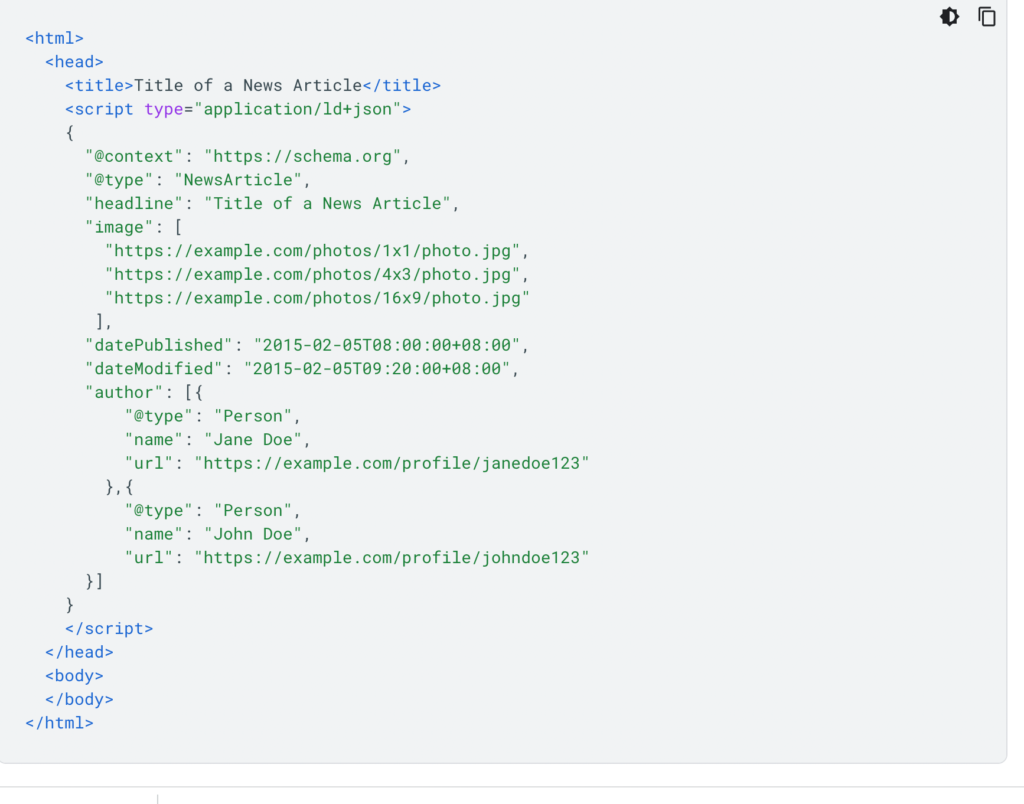
You should not expect to rank better after adding structured data reviewed by markup on your website and there is no reviewed by markup for article schema, WebPage Schema and there will be only published by, Modified By schema – it helps Google to understand your website and gain EEAT (Experience, Expertise, Authority, Trustworthiness). Reviewed by schema is no where used.

Nothing happens, Nor you will get a ranking boost, nor google will consider reviewed by schema markup in structured data to show in rich results (no option to show). 

Also Read:

1) XML Sitemap couldn’t fetch error in Google Search Console

2) How to Fix Page With Redirect Error in Search Console

3) How to Fix Pages Not Indexed Status URL in Google Search Console

4) How to Implement MedicalWebPages for Medical and Health Care Websites

5) Fix and Recover Google Rankings Dropped Overnight Guide

Is Structured Data a Ranking Boost?

No! Structured Data is not a Ranking factor nor does your website get a ranking boost after adding structured data.

Even though you are eligible and you have set up everything correctly in structured data then it will not show or you should not expect it to show rich results in Google.

Why Does Google Use Structured Data?

Structured data is used by Google to appear in Google Rich Results and there is no advantage of adding reviewed by Schema on the website and it becomes hacky structured data when you add schema markup which is not used by Google and google may consider it or sees your website content differently.

Google uses structure data to understand content better, when you add structured data then google will be able to show you in Rich Results Snippets in Google Search result and when you add reviewed by schema then there is no such kind of snippet used by google to detect Reviewed by Google to show in rich results.

Why Many Websites Are Adding Structured Data Reviewed By Schema Markup?

If other websites are using reviewed by on their website – then they are not depending on Google search rich results to appear, they are adding it to measure with different tools available only depending up on their business model and with different tools as google will not consider reviewed by scheme and Google will not support all schema org markup mentioned on schema org website only selective schema properties are used by Google to show them in rich results.

For product review websites, you can use product reviewed by and for content related websites like if you are adding it in news articles schema, or Article Schema then there is no advantage in doing that and its incorrect and google may see your website in a different way and rank it differently, nor they get beneficial with any ranking or get an increase in visibility in Google search results.

Are there no proven theories or Success Stories or by Adding Reviewed By Schema for web pages has increased their ranking or gained a ranking boost and that’s true and if you see other websites saying this – then don’t believe them and drop website url in comment section.

XML Sitemap couldn’t fetch error in Google Search Console

0
  • Wait for google bot to fetch xml sitemap and ping or update your sitemap.
  • Make sure your sitemap is valid and does not return any error and have a valid xml sitemap.

In Google search console if you have submitted sitemap and click on submit and you get an error message “xml sitemap couldn’t fetch error” then you don’t need to worry regarding this error and you can easily resolve this issue of xml sitemap couldn’t fetch error in Google Search Console and this means that google couldnt fetch your sitemap file at present. So, let’s dive in deeper and fix this issue with the sitemap file in search console.

How to Fix xml sitemap couldn’t fetch error in Google Search Console

In search console you can see errors with the sitemap file if the sitemap file is not valid or if any general http error with sitemap file or sitemap file is blocked for google.

Check Sitemap file is Valid and Open it in Browser

Step 1: Login to Search console and select your website property in search console.

Note: If your website is https then you should use httpS version property in search console.

Step 2: Now, click on sitemap section on left side menu

Step 3: On right site click on sitemap file that you have submitted in google search console

Step 4: Click on Open sitemap on top and open sitemap file in browser.

Step 5: If you are able to view sitemap file properly without any issue then you don’t need to worry and if sitemap url is throwing 404 or 5xx level error then you need to resolved this issue and make sure sitemap file is valid with 200 ok response and submit sitemap file in search console.

Now, go ahead and submit the sitemap in the search console again and wait for google to fetch the sitemap file and discover urls and crawl them for indexing.

Also Read:

1) How to Fix Pages Not Indexed Status URL in Google Search Console

2) Fix and Recover Google Rankings Dropped Overnight Guide

3) 10 Common Reasons Why Page Indexed in Google but not Ranking?

4) How to Fix Page With Redirect Error in Search Console

5) How to Fix Discovered currently not indexed in Search Console

Check Redirection Issues

When you setup your website, most of the time there will be an issue with domain versions not redirection to httpS final version url and you need to setup 301 redirect from all version of domain to final httpS version of your website, like www, http, httpS, non-www domain version to final httpS version.

Sometimes, http redirection to httpS gets failed and then you will get xml sitemap couldn’t fetch error in Google Search Console general http error and other errors like 5xx etc.

Check XML Sitemap is Accessible By Google

Sometimes, your hosting provider may block google sitemap files and this can happen and to check whether google is able to crawl a sitemap file, you need to go to the rich result test and drop the sitemap url in there and perform the test.

Perform Live URL Test with Sitemap URL

Step 1: Open Search Console and copy sitemap url of your website

Step 2: Click on top search url inspection tool and paste the sitemap url file and hit enter.

Step 3: Wait for google to fetch sitemap file and once done, you need to click on live url test and see the results.

Step 4: If you don’t see any error in live url test of your sitemap file, then you don’t have any issue with sitemap file and wait for google to crawl sitemap file.

Wait for Google to Crawl Sitemap File

If you see xml sitemap couldn’t fetch error in Google Search Console then don’t panic, this means that google hasn’t crawled your sitemap file yet and google doesn’t look for sitemap file every time you update it and google checks for the first time when google notices it. Only submit sitemap when its changed or updated and make sure you provide last modified date in sitemap file.

Why xml sitemap couldn’t fetch error in Google Search Console

If you have submitted your sitemap file recently then you can expect to see sitemap coulldnt fetch – meaning sitemap file is not yet processed or crawled by google and this does not show any affect on your website. It doesnt affect anything or change anything on yoru website. 

Google is just letting you that sitemap couldnt fetch – if google encounters an error when fetching sitemap file, then it will show you error like general http error or 5xxx error or any other error respectively with sitemap file in google search console.

Does sitemap file error xml sitemap couldn’t fetch error Cause Website Drop in Traffic

No! Sitemap file doesnt affect anything with regards to indexing or crawling or any kind of ranking drops and if your website ranking is dropped then you need to check with website ranking drop reasons and ranking updates by google – this will cause your website ranking drop from Google search.

Fix and Recover Google Rankings Dropped Overnight Guide

0
  • Check with latest Google Algorithm update released by google and changes they have made in Algorithm update and check for manual action in search console if you received any.
  • Analalize search traffic drop patterns and start optimizing pages and review expertise and authority of website and author and check with links (affiliate or shop links) and provide helpful content and delete irrelevant content.

If your website ranking dropped overnight from and you are seeing your website is not ranking for keywords that were used to rank on top and all of sudden this happened and your ranking still going down week by week or day by day then you have been hit by Google core algorithm update and to check with the dates or with which google algorithm you website got hit then check the list of core algorithm update log here.

First thing, you need to sit back and relax and grab a cup of coffee and start analyzing your website and you will need to access search console data and google analytics to identify the traffic drop and check with Manual Action section in Search console. So, let’s see in detail here and check google spam policy closely.

Fix Google Rankings Dropped Overnight

Google Rolls Algorithms for every 3 months or 6 months or sometimes continuous updates as well to improve search results in google, they also say that there is nothing wrong with your website and if other qualifying website are pushed up in search results then you will see change and sometimes these changes are noticeable and sometimes these changes are not noticeable as well.

If you are seeing sharp decline in Search Console performance report or in Google Analytics then you are hit by Google core algorithm update and mini algorithm as well (not confirmed – just an seo talk)

Google does provide information regarding the core update and what change they are making as well, like if they are rolling spam updates they will provide a guide for websites to recover as well.

If it’s a helpful content update then they will suggest website owners to provide helpful content and delete unwanted content or improve website content.

If it’s with page speed they will suggest website owners to load the website faster and fix website loading issues etc.

Identify Website Traffic Drop Pattern

You need to login to the search console and check by comparing site performance to previous days and look closely and identify the search traffic drop and once you identify search traffic drop then try to make changes and make improvements to the pages providing more rich information and optimize the page.

The best way to start is by reading from basics here at seo starter guide closely.

If you are seeing website ranking drop for pages which containing too many affiliate links articles which you are having on your website like amazon links (buy now) etc then you need to provide rel tags and tell google that these links and tell google via rel tag and tell more regarding links on your website.

If you are having same item, description with no added value from other website then this falls in thin affiliate pages and you need to provide a unique description and title.

Author Authority Matters

Google does check with the author and the amount of author expertise and google will check with author experience and bio as well and avoid keeping article written by admin etc, provide original author information and Bio.

Copied Content

If you have taken content from another website and changed one or two paragraphs using synonyms and all techniques, then google may rank your page at some point but with google core update – Google will slash hard.

Feed Ads or Too Many Ads on Page

If your website page is outranking with ads like displaying too many ads which can outrank your website and this may lead to users for accidental clicks and redirect websites to ads clicking page and this will affect website quality as well.

Expertise of Author 

If you are providing information regarding medical topics or YMYL (Your Money Your Life) pages then google needs to know that the article is written by an expert or the content is just drawn from other sources and rewritten and do provide detail author expertise in his or her niche with a substantial amount of author expertise bio information with a degree in expertise.

Slow Loading pages

Loading speed and core web vitals are ranking factors and this is one of the ranking factors from many google algorithms and you need to make your website load faster with less ads with helpful information on the page.

Wait for Next Update

If you are good with all Google Search Spam Policies (Guidelines)  and there is nothing there for you to fix and no technical issues and all then you need to wait for google next update and this is not guaranteed there may be a reversal for released core update sometimes which few website owners say in SEO community and check with what happens with core update guide.

Follow these above mentioned sections and optimize your website and recovery guide will help you get your website back on track.

How do you Analyse website traffic drops?

Login to the search console and click on performance and start comparing search console performance from previous periods and analyze search traffic by looking closely with the ranking drop pages and see any similarity in traffic drop pages.

Why Has My Website Dropped in Rankings

You got hit with one of the core updates released by Google and this is pretty common and ranking fluctuation happens with every core update release and if you are not violating any guidelines of google then you don’t need to worry.

What to Do if Website Got Hit with Google Core Update

Review spam polices and core update guide and check every corner of your website, specially with authority of author and website and links on your website and make sure you are providing helpful content on your website and don’t write for search engines and write for users.

FAQ

Google ranking dropped dramatically

If you got hit with Google Core Algorithm update then traffic will decrease overnight dramatically and you need to follow recovery guide and follow google spam policies.

Why Do Our Search Rankings Drop on Weekends?

This is just users not searching for the keywords in Google on weekends, perhaps they are in a party mood at weekends.

10 Common Reasons Why Page Indexed in Google but not Ranking?

0
  • These are the 11 most common reasons why pages are indexed in Google but Not ranking for keywords and common mistakes.
  • Check with Spam Policies of Google and make your page load faster, don’t spam, rewritten content, not having satisfactory amount of helpful content, less author info or about us page and other reasons mentioned below.

 Indexed but not ranking is common issue these days and if you have made your website live and updating content on your website regularly with unique content and following all google guidelines with good and informative content with unique quality and still your website is not raking in Google or your website page is indexed in Google but you are not getting traffic for your website, then lets see the most common reasons why your website is not getting enough traffic for your website even though page is indexed in Google.

First thing you need to know is Indexing and Ranking both are different and all indexed pages will not rank as expected and all pages you have on your website will not index as well. Website Quality and plenty of ranking factors come into play when it comes to indexing.

Common Reasons Why Page indexed in Google But Not Ranking

Despite all efforts you keep on your website and your hard work is not getting enough traffic or estimated traffic or sometimes very less traffic as well. Well if your content is good and helpful to users then google will index the page for sure.

Top Competitive Keywords

If you are writing content for top competitive keywords there is very less chance for you to get into top ranking and you need to always choose less competitive keywords to rank in google.

You are Not Provide Rich Information or Helpful Information

If you are providing rich information and helpful information and not writing for search engines then your content will index automatically and there is no need to manually request index url in search console as well, Google will automatically index rich information or information which is helpful to users and it depends on plenty of ranking factors and you need to focus on content.

So, you need to provide rich information and content which is helpful to users and its pretty easy to tell, check your heading and make sure that your title is having satisfactory amount of solution or information regarding the title and sometimes the information your provide will not be enough and you need to provide more information organizing your title heading accordingly.

Author Info

Google check for expertise and author info that this article is written by expert or it is just a research article and you need to provide more author info like author bio, degree and his expertise with links pointing to them and you need to have a author bio page telling Google that the author is an expert.

If you provide good information then google needs to trust your website and author and if you write a good article with rich information regarding the topics you write then you need to name the author and you should not keep written by author or admin or team as author.

Website Trust Issues

If you have everything good in place and your website does not represent who you are and what you are on the us page then google will not trust your website not knowing who you are and you need to provide a good about us page.

Write For Users Not For Search Engines

This is a very common situation every website experiences, sometimes without knowingly the information which you have on your website may go off board while preparing heading tags and titles and sub heading etc and in this situation your title doesn’t match the content.

So, Make sure you use titles and information that you offer or presentation of the page should provide valuable information for users and write content for Normal users and you should always write information for Users Not for search engines.

Also Read:

1) How to Fix Page With Redirect Error in Search Console

2) How to Fix Pages Not Indexed Status URL in Google Search Console

3) How to Fix Discovered currently not indexed in Search Console

4) How to Fix Crawled Currently Not Indexed Solutions

5) How to Implement MedicalWebPages for Medical and Health Care Websites

If you are having enough good information and your website article is answering google user what he is looking for in Google search and still your website article contains too many affiliate or sponsored or buy now, offer or amazon, or any other affiliate links and you are not telling google what relationship you have with these links and these links can dominate rich information or helpful information that you are providing and outrank your article which may lead to the issue of page indexed but not ranking in Google search issue.

Initially the page may rank well and perform good as well, but at some point when Google rolls the algorithm then this will give you a good hit and cause a massive drop in Google SERP.

Too Many ADS

If you are having too many ads on your website page and your content is unique and your content is helpful to users but if you are having too many ads on your page this can lead to issue like page indexed in Google but not ranking issue and you need to provide less ads and less ads are always good and providing too many ads will lead to mislead user while reading your content by clicking on AD links.

Too Many ads on page doesn’t provide you much revenue as well if you are confused regarding getting less revenue for less ads kind of scenario.

Slow Loading Page

If your website is loading slow and its taking forever for users to wait or its taking more than estimated time like 3 seconds and you need to measure page speed of your website and follow recommendations and make your website faster. 

Google Doesn’t want to show slow loading pages to users and you need to make your website load in 1 to 2 seconds and you need to check with core web vitals in search console and load lcp, fcp, cls and you need to make sure your website loads faster satisfying lcp, fcp, cls.

Server Issues

If your website is having server related issues like your website is throwing 5xx level errors like server connection timeout or page cant be reached or any other server related error then google will back of while crawling assuming the further crawling may even slow your website which leads to 5xx server level errors then google will stop crawling and limit its crawl rate as well and if you want you can limit crawl rate in google search console if you think google bot is slowing down your website.

Google will not show a website that will return a 5xx level error page to the user which is very bad.

This is pretty tricky issue and very hard to find these kind of issue if you don’t use tools like intodns website or any other dns checker tool available online, though search console does show DNS related issues now in Settings HOST up and down section but if you are expiring dns related issues then you might want to talk to your hosing provider and resolve this issue as this issue occurs at some point and tricky to catch as well as site will show you up and running perfectly but after sometimes site will not work like the same server issues.

Scraping Content or Rewriting Content

Sometimes, you may think that the content which you are writing is unique by simply changing synonyms or rewriting the paragraph which is already published on the Web or by taking reference from other websites. When you take change paragraph and rewrite content from different website then many plagiarism tools will not detect it as duplicate content but google algorithms are pretty much good at finding these kinds of pages which are rewritten by just changing words and synonyms or by just modifying few lines and google pretty much cleared this in spam policies of Google in Scrapped Content Section which is against the guidelines of Google.

Why are My Articles Not Ranking in Google?

If your website is new then it can take sometimes to google to index your website and rank accordingly and if your website is old and suddenly your page got disappeared from 1st page and lost website ranking then you need to check with core updates and review spam policies and comparative questions as well and recovery guide here will help you get back on track.

Also Note that all pages google discovers on your website will not be indexed if google feel that the information is helpful to users then google will rank it for sure and if google doesn’t then it will not and you need to check search essentials here.

How do you optimize an article to rank on Google?

You need to look for what real users are searching and check whether your website page is having satisfying amount of unique and helpful information regarding the topic you are talking about on your website.

Optimizing your page title with accurate title and provide accurate meta description and correct any spelling mistakes, paragraph sentence if it’s not framed correctly and avoid repetitive keywords and the best way to start is by visiting seo starter guide.

FAQ

Indexed but not ranking

Page indexing in Google does not guarantee that your page will be ranking – it rely up on plenty of ranking factors to make sure your website is loading fast with less ads and your content is helpful to users and doesn’t violate google guidelines.

Page Indexed in Google But Not Ranking

When it comes to Ranking it relies on many ranking algorithms and if you are competing with highly competitive keywords then your website won’t rank higher in Google.

How to Fix Page With Redirect Error in Search Console

0
  • If a Page A has a Redirect to another Page B on your website then google will list urls in the page with the redirect error excluded section in Google Search console.
  • To fix a page with a redirect error then you need to avoid keeping redirects to another page.

In search console if you are getting to see errors in excluded section and pages not indexed in google search with an error message “Page with redirect” then this is not an error and you can get rid of this error easily and know more about page with redirect error in google search console and many webmasters wonder how do I fix excluded pages in Google console and they don’t know exact reason why google is listing urls as page with redirect. So, let’s see in detail.

You will receive a page with redirect error message in search console then the page has a redirect and page with redirect on wordpress website or it can be shopify website, squarespace, joomla, drupal or any other website then this error message will be listed if a page has a redirect to another page.

What is Page with Redirect Error in Search Console

Page with redirect error is not an error – its a Message that search console is notifying you that Page A has redirect to Page B and the Page is having a redirect and page A will be listed in page with redirect error in search console.

Fix Page With Redirect Error in Google Search Console

If you are looking to fix page with redirect error in search console and want to fix all urls listed in page with redirect in search console, then you can fix them and as the page has a redirect to another page on your website and the redirect page (301) will not index and only the final redirected version page will only index.

If you are having page with redirect for long time then google will crawl the url at some point and then drop the redirect version from the list of urls listed under page with redirect error message and stop crawling the which is having redirect as well. This can take a little bit of time as google bot should know that the page is no longer needed to be crawl.

How to Check Page with Redirect Error in Search Console

  • Login to Search Console Account with your login credentials.
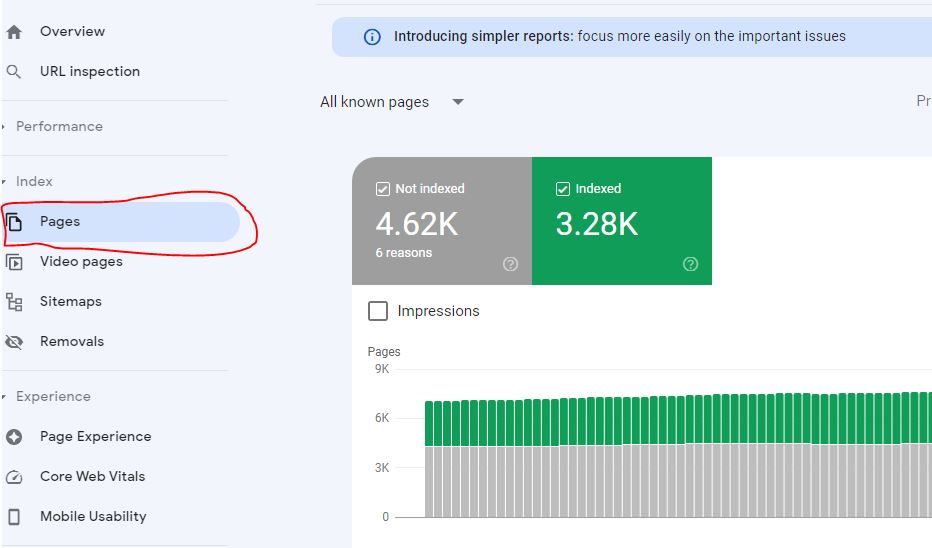
  • Under Index Section -> Click on Pages page.
  • On the right side click on Non Indexed Pages to see a list of Page with Redirect error.
  • Scroll down and you can see all list of url having page with redirect error message in Google Search Console.

That’s it, this is how you check page with redirect error in google search console and fix page with redirect error and avoid getting page with redirect error in search console.

Does Page with Redirect Error Affect Website Ranking in Google Search

No! You don’t need to worry regarding page with redirect error message as this doesn’t affect any indexing process in google search not it can affect your website ranking negatively. Search console is just notifying you and letting you know that the pages has a redirect.

Page with redirect status excluded

Page with redirect status will be executed as the page having a redirect version will not be indexed and final redirected url of the page will only index.

How to Check Page with Redirect Error Page has a Redirect or Not

  • Open Google Search console -> Click on Top Search bar
  • Copy and paste the link which is having page with redirect error and hit enter.
  • If you are getting to see the page has redirect or the page is redirect to some other page then you will get to know the page with redirect is having error message or not.

Page With Redirect Error Not Indexed in Google

Pages which are having page with redirect message will not index in google search as the page is having a redirect to other page then the other page will be indexed.

How long Google Will Crawl Page with Redirect URL

There is no particular time frame regarding google crawling the page with redirect urls as it can take long time as the crawling process will include that if page with redirect url is given by other website as source and google can crawl the url from other resources or it available to crawl out side of your website then will crawl the page.

Page with Redirect But Google Still Crawling the Old URL?

You need to make sure that if Page A is having temporary redirect (302 or 307) then google will crawl the page as well as the redirect added to the page from A to Page B is temporary and you need to have 301 redirect which is permanent redirect then google will eventually drop it at some point and there is no time frame.

FAQ

Page fetch failed redirect error

If your page is having a redirect to another page you will get to see page fetch failed redirect error in google search console.

Page is Not Indexed Redirect Error

If page is having redirect to another page then you will page will not index.

How to Fix Pages Not Indexed Status URL in Google Search Console

If pages are not indexed in Google then its very frustrating situation for every website owner and seems like everything looks fine on your website but sometimes there may be an issue with Google Systems as well like crawled currently not indexed or Discovered Currently not indexed status urls and these url status means that the issue is not with your website but the issue is with google System.

Now, in Google Index Coverage section Google segregated the issues with your website or with Google systems as a source and if you see issues with your website or with Google Systems.

Fix Pages Not Indexed Status URL in Google Search Console.

There are many reasons why the page is not indexed on google and the report in index coverage section helps you understand better and you need to identify why your pages are missing from Google search first.

Step 1: Login to your Google Search Console 

Step 2: Click on Index Coverage Report on Left side menu

click-on-left-side-index-coverage-min

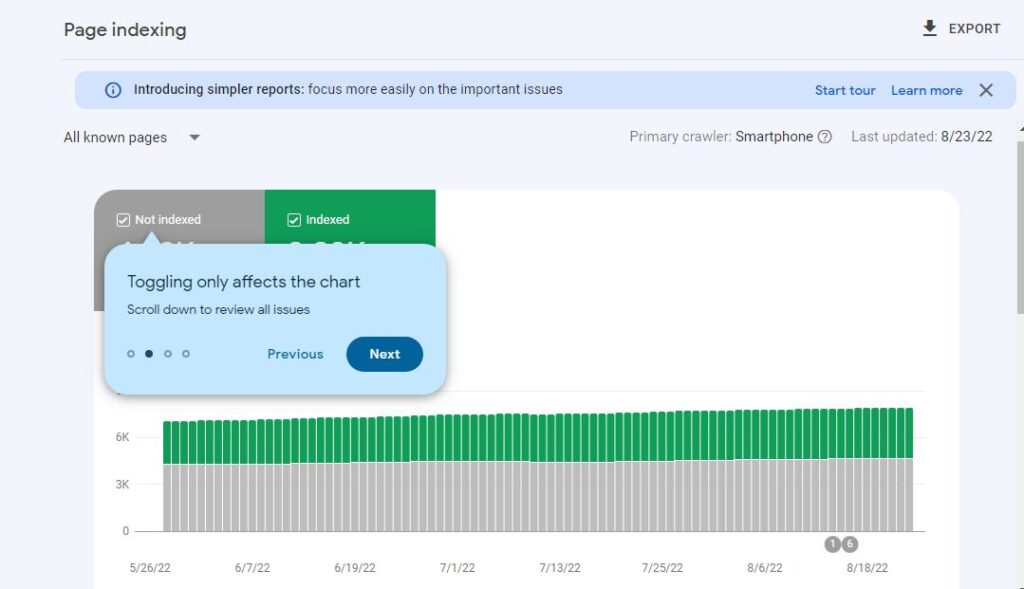
Step 3: Now, you will see Not Indexed and Index Sections here (previously, it was Erros, valid with warning, Indexed, Excluded Section here).

pages-indexed-and-not-indexed-in-google-search-console

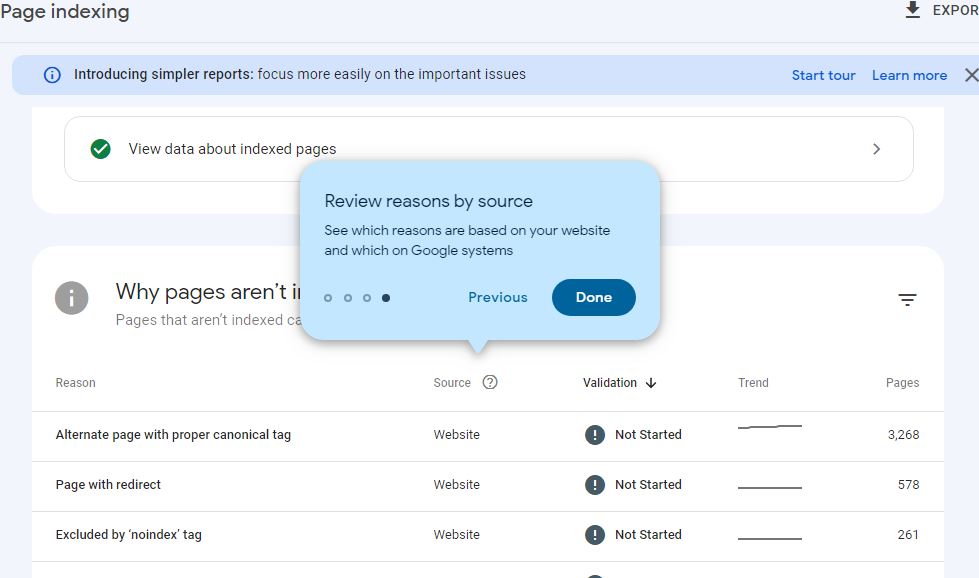
Step 4: Select Not Indexed Pages and Scroll down and you will see section “Why pages are not indexed” Pages that aren’t indexed can’t be served on Google.

review-reason-by-source-page-index-or-not-indexed

Step 5: You will see a list of pages which are not indexed in Google Search along with reason and source, Validation, trend and pages.

Also Read:

1) How to Fix Discovered currently not indexed in Search Console

2) How to Fix Crawled Currently Not Indexed Solutions

3) How to Implement MedicalWebPages for Medical and Health Care Websites

Identify the Reason for Page Not Indexing

Step 1: In Search Console Index Coverage report -> Select Page Not Indexed Section in Search Console.

Step 2: Scroll down and Under Why Pages aren’t Indexed Section you will see a list of reasons why your pages are not indexed.

Step 3: Some of the Main reasons why pages are not indexed reasons would be – Discovered currently Not Indexed or Crawled Currently Not indexed and if you see these 2 errors then there is nothing you can do and the reason is Google System that means – google is not indexing which is not in your hands – which is Google Systems.

Step 4: Identify the reason for not indexing here, like pages with redirect, excluded by no indexed tag,  Not found 404, Soft 404 and many other reasons.

Step 5: if the source is website action here -> then you need to make changes to your website and fix the issue.

Fix page Not Indexed in Google Search Console According to Reason and Source

Fixing issues with pages not indexed on Google search or pages showing not indexed section can be fixed if you identify the correct reason and provide a valid fix to the url in pages not indexed section.

Reason for Page Not Indexing – Excluded By No-Index Tag Source Website

This means your page has noindex meta tag on your page and to fix page not indexed due to excluded noindex tag, you need to remove meta tag noindex from the page.

Note: If you have intentionally Kept noindex tag on the page, then you can simply ignore this error excluded by noindex meta tag.

Page Not Indexed Reason is Page with Redirect and Source is Website

This means the url of the page has a redirect which is 301 redirect which is a permanent redirect to another url and page or url which redirect to another url will not be indexed. For example A has a redirect to B and A page will not be indexed and B Url of the page will be indexed and A will be dropped from Google search at times if it gets indexed.

Page Not Indexed Reason 404 – Source Website

If page is throwing a 404 then 404 pages (not found pages) will not be a part of Google index and these pages will not index and if you want to get rid of 404 pages and fix 404 pages then you need to redirect 404 page to relevant pages with 301 redirect and your issue of pages not indexed reason 404 will be fixed.

Note: Generally, pages with too many 404 pages will not affect your website ranking at all.

Page Not Indexed With Soft 404 – Source is Website 

If a page not indexed Reasons is Soft 404 then google will not index thin content pages and google is expecting you to provide more information on the page and update the page. Pages with less content will be thrown with soft 404 error. By updating content and providing more information on the pages the soft 404 issue can be resolved.

Page Not Indexed Due to Alternative page with Proper Canonical Tag Website Source

Alternative page with proper canonical tag is just means that your page has an alternative version of the page and there are 2 canonical tags there are two versions of a page on your website having the same canonical URL and google will not index duplicate version and index the new version. 

Page Not Indexed Reason Crawled Currently Not Index – Source Google System

If the page not indexed reason is crawled currently not indexed and source is google system then there is nothing wrong with your website and the Google System are playing a role here.

Page Not Indexed Due to Discovered Currently Not Indexed – Google Systems

This is an issue with Google System and discovered currently not indexed is not an error and this means google discovered your website url but did not crawl it for indexing yet and this is Google Systems and Algorithms comes to play a role depending on website quality and content.

How To Add or Link Email Address In WordPress Posts or Pages

0
  • To add email link address in wordpress post or pages -> login to your wordpress -> Open the page or post that you want to add -> Highlight the text and click on insert link (click on Link button) on top of editor and type mailto:emailaddress and press ok and update the post.
  • Shortcut to add email address link to posts or pages is -> Open post or pages -> press control + K and then insert link box will popup -> Enter email address with mailto:emailaddress and press ok and update wordpress post or pages.

If you want to link an email address with your wordpress on your posts are pages then you can easily do that and creating an email address of the person that you want to add in posts or pages and mapping that email address with your WordPress is pretty easy and all you need to have is an email address and a WordPress website. So, let’s see in detail below.

Many users will be confused about how to add or link an email address to their wordpress website posts or links (anchor links) and you can do it in two ways here and you can add it using shortcut key as well in wordpress and link email to post or add hyperlink as email in posts or pages.

There are two ways to do this quickly and easily. And we’ll see why you might not want to add these email links to your WordPress website to get started by adding or linking your email address to wordpress. 

Step 1: Go to your WordPress website and go to admin login url 

Step 2: You will see a WordPress admin login screen where you can log in using you administrator login details.

Step 3: Alright, from here we need to decide if you want to create an email link in your post or a page.

Step 4: Open the post or page that you want to add an email link to a post or link an email address in WordPress posts or pages.

Step 5: Highlight the text area that you want to add the email link on your post or pages like: contact us in a page mentioned in a page (so go ahead and highlight the text – contact us and website where you highlight the area.

Step 6: Click insert and from here you can type in the HTTP or HTTPS and you add the address and click add link and now you have a hyperlink to a website.

Step 7: Adding an email link click insert and then we expand the whole thing when doing an  email link you simply use the mailto: prefix instead of the HTTP or HTTPS and this is a valid email link on your website.

Also Read:

1) How to Add Audio Files on WordPress

2) How to Insert More Tag in WordPress or Read More Tag on Pages Without Plugin

3) How To Fix Error Too Many Redirects Issue In WordPress

4) How to Enable Debug Mode in WordPress

The second method of adding an email link it’s useful if you want to add an email to say the sidebar or somewhere in your WordPress theme you will want to actually type out the HTML code for it to work.

Step 1: Go to the text editor area and we’ll highlight the code.

Step 2: We want to copy (mailto:email address here) this you can either click command or ctrl C to copy or right click and click copy so you’ll have it in your clipboard.

Step 3: Go to Appearance widgets because we’ll add the email link to our sidebar area.

Step 4: Scroll down to find the text widget and add that to the sidebar paste in the code from the post and click save.

Step 5: Now, we have an email link on our sidebar area right now we’ll see how you can add the links

That’s it, this is how you add link to email address in wordpress posts or pages on your wordpress website and link to an email address in wordpress.

WordPress Shortcut to Add email in Post or Link to Email in posts

Step 1: Open the page or post that you want to add or link email address.

Step 2: Highlight the text that you want to add email address or link to.

Step 3: Now, go ahead and press Control + K and insert link will be appearing now.

Step 4: Go ahead and copy and paste email address like this -> mailto:email address.

Step 5: Make sure that you add maito next to email address or else the email that you link will not work.

What is mailto when linking email Address in posts or pages

You need to add mailto to tell that the link which you are linking or adding posts or pages on wordpress is a mailing link and when ever user clicks on that link it will open with their inbox ( if they login to their Microsoft account or outlook or any other email address – default login address on their email address).